

TL;DR
– Challenge: TomTom gets IT and HR requests from employees worldwide. Jira had no reliable way to know where each requester was located, so tickets couldn’t be routed to the right local queue.
– Solution: User Profiles for Jira brings user attributes such as location into Jira. ScriptRunner then uses them in JQL and automation.
– Result: Requests go automatically to the right regional queue, and agents can see requester context right in the ticket. The setup also kept working through TomTom’s move from LDAP to Microsoft Entra ID.
As technology is evolving at such a dizzying pace, businesses are rapidly adopting it to streamline their team’s workflow processes. Automation can undoubtedly empower employees and, freeing them of their most mundane and time-consuming tasks. That’s why every business, small or large, is leveraging digitalization’s limitless capabilities.
Project management tools such as Jira automate workflows. Deep integrations between Jira and other productivity apps let you tailor workflows to almost any scenario. As a result, businesses can establish standardized processes for human resources and customer service request management.
To meet unique business needs and boost productivity, teams must customize default Jira workflows with the right apps. At Communardo, we have developed User Profiles for Jira (Microsoft Attributes Sync). This app gives you powerful new capabilities to improve Jira workflows and maximize productivity and efficiency.
But how can you create an awesome automated workflow with User Profiles for Jira (Microsoft Attributes Sync)? Keep reading to learn best practices to accelerate collaboration and make life easier for your employees.
Automate request management with User Profile for Jira
Giving the workforce the right tools to deliver exceptional customer service is an excellent way to improve customer lifetime value. This is especially important for large companies such as TomTom, which operate globally and want to improve customer service productivity and efficiency.
The question then becomes: How do you handle a large volume of IT and HR customer service requests coming in from all corners of the globe?
Michiel from TomTom, was facing the challenge of finding a solution to retrieve the location of users in Jira and assign these Jira issues to the corresponding queue. To solve this, he searched for solutions to expand Jira capabilities. That’s where Communardo’s User Profiles for Jira (Microsoft Attributes Sync) came into play.
Implementing an automated workflow was quite essential for TomTom. Integrating Jira with the Script Runner for Jira app allowed the Jira Admin to set up a job escalation service and a JQL query based on user profile fields. This additional information displayed in the hover panel has sped up the management of customer service requests. Consequently, retrieving the location from user profile fields makes it easier to assign issues to the corresponding queue in Jira Service Management.
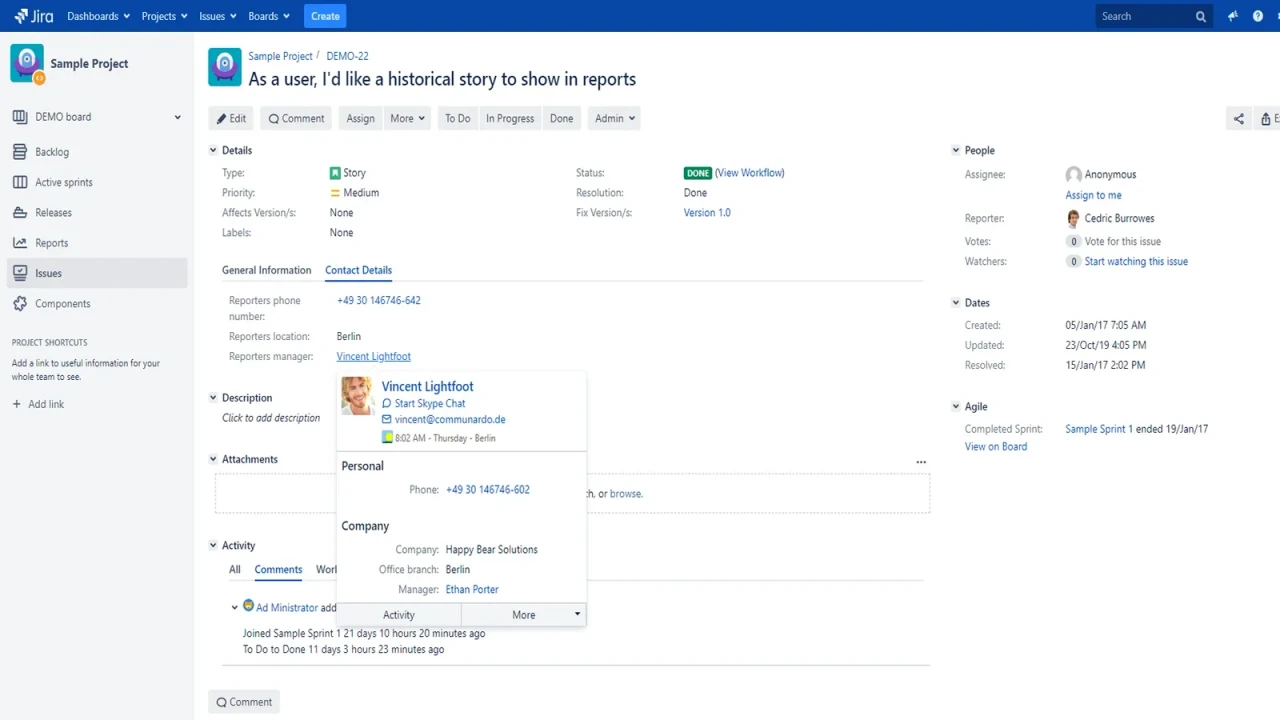
Furthermore, the human resources department is also relying on the reporter’s location attributes for the service management project they use. By creating a direct JQL-query for this custom field, this work process becomes easier for the human resources employees. This way, when employees create a request to Human Resources Department, the information captured in the reporter’s location custom field is used to assign issues to the corresponding queue that handles requests for that location specifically.
Recently, our customer is preparing to switch to Azure AD as the main user directory. By removing LDAP completely, they are looking for Azure AD Sync support.
Considering this and similar requirements from customers moving to the cloud and breaking LDAP Sync, our partner re:solution GmbH developed an integration with their apps SAML SSO for Jira and Users Provisioning Sync & Groups Sync for Jira (for short, User Sync).
With User Sync and SAML SSO, Jira admins can synchronize users from cloud directories like Microsoft Azure AD into the Jira local directory. The integration with User Profiles for Jira (Microsoft Attributes Sync) augments the impact of this synchronization. Thanks to it, customers can truly unleash the potential of Jira workflows in their digital workspace.
Reach the full potential of Jira
Nowadays, teams tackle more than they can handle. Improving workflow efficiency helps your team complete more work in less time and boosts productivity.
Through powerful solutions, such as User Profiles for Jira (Microsoft Attributes Sync), businesses can reach the full potential of Jira and make their work processes more efficient. By completing your workflow with essential information for Jira users, employees will not struggle with time-consuming menial tasks. This way, they will find more time to think big and focus on more interesting tasks.
Frequently asked questions
Couldn’t find what you need?
Yes. Combined with ScriptRunner for Jira, user profile fields can be used in JQL queries and scripted jobs, such as escalations.
Yes. It syncs Entra ID attributes into Jira. In TomTom’s setup it works alongside re:solution’s SAML SSO and User Sync apps.
No. A hover panel shows profile information directly in the JSM ticket.