





















DevSensei PR Workflow Automation | Code Owners for Bitbucket

Automatically assign the right Code Owners as reviewers, generate review checklists, and merge pull requests once your checks pass.

Automate Your Pull Request
Workflow and Merge Faster

Automate your pull request workflow with flexible actions and conditions – easily shareable across repos with configuration as code

DevSensei Pull Request Workflow Automation

Use DevSensei to automate your pull request workflow, such as adding reviewers or auto-merging, using configuration as code with devsensei.yaml that can be shared across repositories. No more duplication!

Smarter assignment of reviewers with Code Owners

Easily define your rules to add Code Owners as reviewers of new Pull Requests. Leverage features such as user groups support 👥, random selection of subsets of Code Owners as reviewers 🎲 and draft PRs ✍️

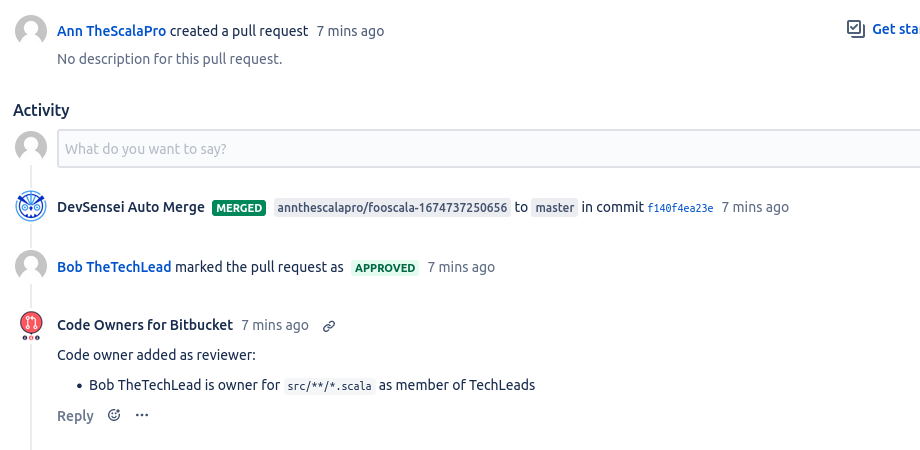
Speed up your PR lifecycle with Auto-Merge

Feel like your queue of Pull Requests is ever-increasing? Focus on Pull Requests that actually need a review and ship those that don’t faster with Auto-Merging PRs.

Why use DevSensei?

DevSensei streamlines your pull request process by automatically assigning the right reviewers, generating review checklists, and merging when conditions are met. Reduce delays, improve code quality, and keep your workflow moving efficiently.

Built-in Pull Request Checklists

Attach conditional review checklists to pull requests — even pin tasks to specific files. Migrate from Checklist Buddy in one click with automatic devsensei.yaml generation.

Embrace the Ship/Show/Ask PR workflow

Embrace the Ship/Show/Ask PR workflow to increase overall productivity (opt-in). SHIP risk-free changes faster, SHOW interesting changes to your peers, and ASK for feedback whenever necessary.

Compliant with most data privacy regulations

Meet GDPR, nFADP, CCPA, and other data privacy regulations and legal requirements with ease by using privacy options.

Real results from real Teams

See how leading organizations use Elevatic solutions to improve collaboration, knowledge management and enterprise workflows.

  • Very useful app, the new view that shows the Code Owners on the side or actually outputs potential errors with the CODEOWNERS file is very useful and much easier to work with than the earlier versions! The only downside is that approvals by Code Owners cannot be enforced but at least they get notified. Support is very responsive and helped me resolve the issues I was having rather quickly, thanks Michael!

    Celio Nelson

Frequently asked questions

Couldn’t find what you need?

  • By default, Code Owners adds a comment with the code owners and reason for their inclusion. Like any comment, this sends out a notification.

    If you do not need this comment and want fewer notifications you can disable it by adding following line in the Code Owners file. It must be in the top-level Code Owner file.

    CODEOWNERS.toplevel.create_pull_request_comment disable

  • As of version 8.14, Bitbucket Data Center includes a native Code Owners feature.

    The following table aims at providing users with a clear understanding of the feature set available for the native Bitbucket Code Owners feature and our Code Owners app: 

    FeatureCode Owners for Bitbucket appBitbucket native Code Owners feature

    FeatureCode Owners for Bitbucket appBitbucket native Code Owners feature
    auto-assignment of reviewers✅✅
    file/ folder path patterns✅ 🔗/features/FeatureCode.java @developer✅/features/FeatureCode.java @developer
    file extension patterns✅ 🔗**.css @developer✅**.css @developer
    exclusion patterns✅ 🔗frontend/* @frontend-team # no mandatory review for tests !frontend/*/tests/**❌
    Match options of patterns✅ 🔗src/{main/**,test/**} @devs **.{ts,js} @web-devs❌
    assign user✅ 🔗@developer @"Paul the JSGuru" paul@example.com✅@developer
    assign user groups✅ 🔗@@developers Bitbucket groupsBitbucket reviewers groupscustom groups defined in CODEOWNERS file❌
    assign random subset of reviewers✅ 🔗CODEOWNERS.toplevel.assignment_routing random 2❌
    custom merge checks ✅ 🔗# At least a senior and two code owners in total must approve. OverallCheck(2) Check(@@Seniors >= 1)❌
    Fallback groups
    (users who can be added as reviewers and whose approval counts for merge checks in case of code owners absence)
    ✅ 🔗@@@FallbackOwners @paul @monica❌
    Flexible configuration✅❌
    Enable/disable per project✅❌
    Enable/disable per repository✅❌
    mono-repos support (possibility to have different CODEOWNERS files in different folders)✅❌
    auto-merge of PR✅ 🔗✅ 🔗
    ship/show/ask support✅ 🔗❌
    support draft PR(no reviewer assignment until PR is ready to review)✅ 🔗✅ 🔗 
    Code Owners Playground for interactive experimentation✅ 🔗❌
  • Destination branches: Inclusion

    Per default, a Code Owner file affects pull requests for all destination branch names. You can make a Code Owner file to only apply pull requests with specific destination branches. For that you need to configure the destination_branch_pattern option in your Code Owner file, where you can configure a pattern for matching destination branches in pull requests.

    For example, if you want to activate code owners only for pull requests for the destination branch master :

    CODEOWNERS.destination_branch_pattern master
    

    If you also want to have pull requests with release branches covered by Code Owners, also add this next line:

    CODEOWNERS.destination_branch_pattern release/*
    

    Source branches: exclusion (since 5.1)

    Per default, a Code Owners file affects pull requests for all source branches. You can make a Code Owner file to be excluded for pull requests with specific source branches.
    For that configure the source_branch_exclusion_pattern option in the Code Owners file.

    For example, if you want to ignore code owners for pull requests created by a bot, which creates pull requests with source branches named e.g. like renovate/update-X :

    CODEOWNERS.source_branch_exclusion_pattern renovate/*
    

    Used pattern format is similar to the Atlassian branch permission patterns.

  • If you want to disable the auto-assignment for all pull requests in a repository:

    1. Go to Repository settings
    2. Click on ADD-ONS -> Code Owners
      1. Disable: Auto-assignment of Code Owners for current repository.
        1. No reviewers will be assigned to new PRs or updated PRs.

  • As of version 8.15, Bitbucket Data Center includes a native Pull Request Auto-merge feature.

    The following table aims at providing users with a clear understanding of the feature set available for the native Bitbucket Code Owners feature and our Code Owners app: Enlarges the table by opening it in a full screen dialogOpen

    FeatureAuto-Merge in Code Owners appBitbucket native Auto-Merge feature

    Enlarges the table by opening it in a full screen dialogOpen

    FeatureAuto-Merge in Code Owners appBitbucket native Auto-Merge feature
    Author can decide during PR creation if should be Auto-Merged✅❌ Only possible once the pull request is created
    Ship/Show/Ask Support✅ 🔗❌
    Auto-Merge supports Code Owners✅ 🔗 Only Auto-Merge when Code Owners approve 
    Auto-Merge Cancellation✅image-20240417-154610.png✅
    Auto-Merge Policy visible in PR lists✅ You can see in the PR title the type of the Auto-merge: [AUTO], [SHIP], [SHOW], [ASK]image-20240416-163452.png ❌
    Available in older Bitbucket versions✅ >= Bitbucket 7.6❌ >= Bitbucket 8.15
  • You can select “Manual merge” and requiring “No” approva. This will act as if Auto-Merge does not exist for your pull request.

  • Bitbucket 7.15 introduced the “Branch deletion on merge” setting, available in Workflow > Branches on your project or repository. Auto-Merge will respect this setting when merging a pull request. This means that Auto-Merge will follow the behavior specified in that setting when merging a pull request.

    If the version of your Bitbucket instance is 7.14 or lower, then Auto-Merge will delete the source branch on merge.

  • For the most part, Auto-Merge and Code Owners are two independent features next to each other. However, Auto-Merge will skip Code Owners merge checks in the event of a [Ship] or [Show] pull request.

    In particular:

    • a [Show] pull request doesn’t require any approvals to be merged. Moreover, if Code Owners requires approvals for that same pull request, they will be skipped. Therefore the pull request will be automatically merged even if Code Owners merge checks are not fulfilled.
    • a [Show>=2] pull request will require two approvals, regardless of who they are coming from. If for its part, the merge checks on your repository are configured to require 3 approvals, then in total only 3 approvals will be necessary. Code Owners merge checks will be skipped.
    • The same applies for [Ask>=2], but they the key difference is that the Ask pull request will not skip Code Owners merge checks. The other difference is that it will not auto-merge.
    • a [Ship] pull request will skip assignment of Code Owners. This is inline with the philosophy of Ship/Show/Ask: Ship pull request are meant for tiny and trivial changes to your repository. Such changes will be more effective if you don’t bother other team members to carry them through.
  • We provide detailed documentation on how we process personal data and how you can configure privacy settings to meet your organization’s requirements.

    Please refer to these sections for more information:

    • Privacy Policies: Our central Privacy Policy page explains our general approach to data protection and GDPR compliance.
    • Subprocessors: A current list of all third-party service providers we use is available on our Trust Center.

    For further inquiries regarding data protection or to request a Data Processing Addendum (DPA), please contact our Customer Support Team.

  • Information regarding the security measures, infrastructure, and compliance standards for our apps is centralized in our Trust Center and specific documentation pages.

    To find the details you need, please refer to the following resources:

    • General Security Overview: Visit our Trust Center for information on encryption, infrastructure, and certifications.
    • Data Residency: For details on where your data is stored and how to pin it to specific regions, see Data Residency for Elevatic Cloud apps.
    • App-Specific Security: Every app listing on the Atlassian Marketplace contains a Privacy & Security tab with a standardized security questionnaire.

    If you have specific security requirements or need a security whitepaper, please contact Customer Support.Pagination

Let’s make Atlassian
work better for your team

Our apps connect Confluence, Jira and Bitbucket with the tools you already use, like Git, Microsoft 365 and SharePoint.
Tell us what you need and we’ll help you find the right solution.
