

TL;DR
Challenge: Business process documents were split across SharePoint and Confluence. Duplicates and out-of-sync versions left teams asking, “Which version is the right one?”
Solution: SharePoint Connector for Confluence embeds SharePoint documents and lists in Confluence and lets users upload files to SharePoint from the page.
Result: No duplicate copies, no version confusion, less manual work, and list data that updates in real time.
As technology continues to evolve, businesses are progressively depending on digital solutions to improve workflow efficiency and ensure seamless collaboration among teams. For IT infrastructure teams, managing business process documents can be a daunting task, especially when these documents are dispersed across multiple platforms. This was the case for a Senior IT Infrastructure Engineer who faced growing complexity in maintaining a single source of truth with documents spread across SharePoint and Confluence.
The challenge became evident when employees frequently asked, “Where is the right document?” or “Which version should we be using?” These questions highlighted a significant issue: the lack of integration between their systems led to duplicated documents and versions falling out of sync, causing confusion and inefficiency. Moreover, the process of pulling data from Microsoft such as SharePoint lists into Confluence was unhandy and labor-intensive.
Determined to find a solution, the engineer explored the Atlassian Marketplace in search of a tool that could effectively bridge SharePoint and Confluence. That’s when they discovered the SharePoint Connector for Confluence Cloud. Motivated by the potential to streamline their workflow, the team made the decision to implement it.
By utilizing the SharePoint Connector for Confluence, the team centralized their business process documents in SharePoint while making them easily accessible through Confluence. This integration eliminated the need to maintain multiple versions of the same document, ensuring that everyone could view the most up-to-date files directly from Confluence. Consequently, version control issues were resolved, and the time previously spent on manual processes was significantly reduced. Users no longer have to switch between different systems, improving their workflow and boosting efficiency.
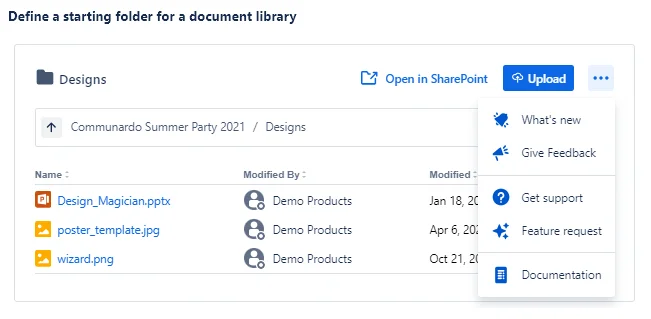
Embedded SharePoint Documents in Confluence

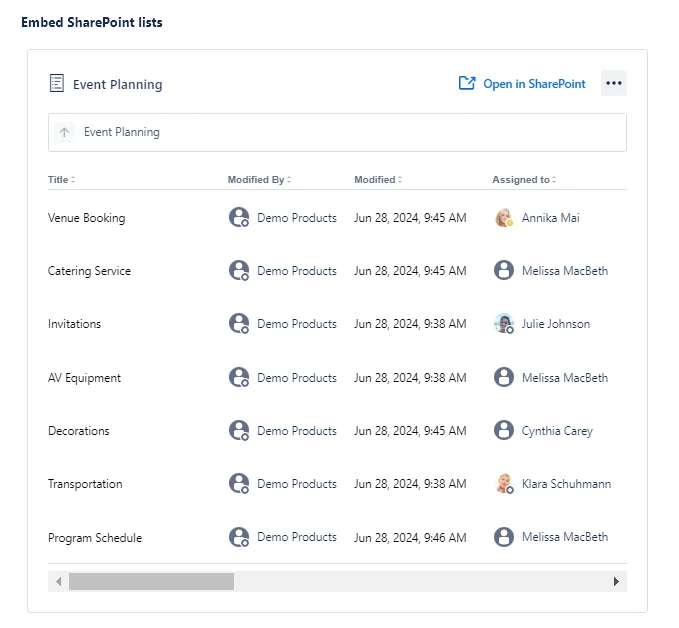
Embedded SharePoint Lists in Confluence
Upload Files to SharePoint directly from within your Confluence page
However, the advantages went beyond document management alone. The SharePoint Connector’s integration of SharePoint lists into Confluence automated their lists, enabling real-time updates and dynamic documentation. A task that was previously manual and error-prone was transformed into a seamless, real-time process, giving the team a clear view of their work and significantly enhancing productivity.
Discover more about this feature here!
SharePoint Online List Configuration – configure the view

View in SharePoint List Macro

By implementing the SharePoint Connector for Confluence Cloud, the engineer found a straightforward solution to their document management challenges. For teams working with documents across SharePoint and Confluence, this app offered a simple way to bridge the gap and keep everyone at the same page. What once felt overwhelming became much more manageable, showing how the right tool can create a single source of truth for distributed teams.
Frequently asked questions
Couldn’t find what you need?
Keep files in SharePoint and embed them in Confluence with SharePoint Connector for Confluence. There’s only one copy, so everyone sees the current version.
Yes. Users can upload files to SharePoint directly from a Confluence page, so new documents land in the right place from the start.
Yes. The app connects Confluence Cloud with SharePoint Online.