

TL;DR
Who: OpenMinded, one of France’s independent cybersecurity pure players, uses Jira to connect its sales, operational, and support teams.
Jira as a CRM layer: OpenMinded uses Elements Connect to pull ERP data into Jira, powering an opportunity qualification process for its sales teams.
External data in Jira fields: “Customer” and “Requirement” are Elements Connect fields that pull from the ERP, with a dependency between them. Account managers pick real ERP values instead of re-typing.
Enforced data quality: Required fields block work item creation until someone adds the missing data back in the ERP. This improved the quality of the source database.
One place for everyone: Business and operational teams get a 360° view of each opportunity inside Jira, with no toggling between tools.
Outcome: Higher productivity, better ERP data, and stronger Jira adoption, paving the way for a future ERP migration.
In sales, the fine line between success and failure is often measured by how well opportunities are qualified. Is the prospect likely to buy? Is your team likely to win? Is it really worth the long effort? Or should you fail fast before moving on to the next opportunity? These aren’t straightforward questions, so controlling the factors you can makes a turbulent sales journey a bit more predictable.
For a real example, look no further than OpenMinded, one of France’s independent pure players in cybersecurity. The company needed a better way to manage opportunity qualification data and processes. It adopted Elements Connect to gather data from an external ERP system inside Jira, connecting people to the data and process.
How do you manage sales opportunity qualification in Jira?
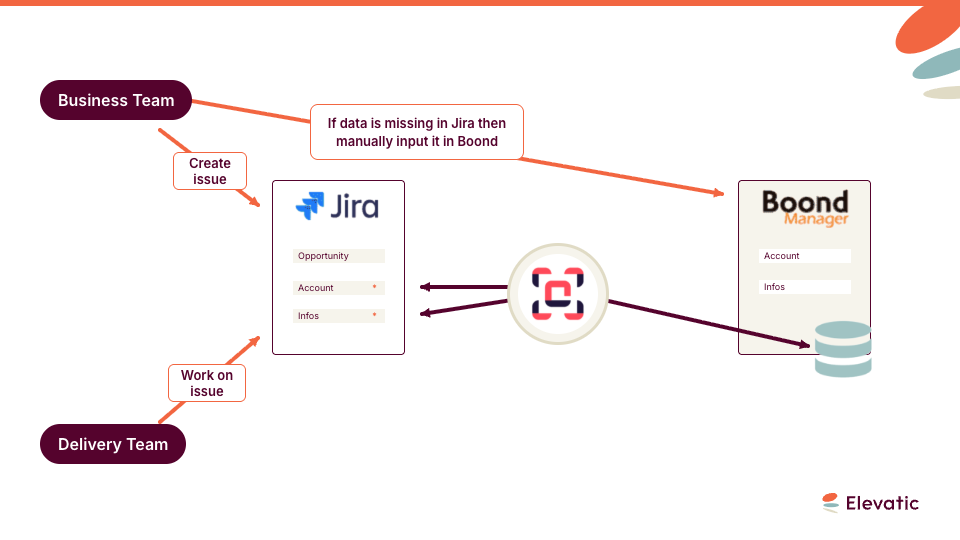
Before adopting Jira and Elements Connect to manage opportunities, OpenMinded tracked these in its ERP system, Boond Manager. But the tool had real limits. For starters, it offered no way to set required fields. So data critical to judging whether a prospect would move forward could go missing. The tool also lacked a workflow to track progress. That made it hard to see who owned which prospect internally, and the status of each opportunity.
Account managers and business developers sometimes failed to spot important information and the quality of data in the ERP wasn’t as good as it should be.
“We knew we would want to move away from Boond Manager at some point,” says Tsuyoshi Shimabukuro, CTO at OpenMinded. “We looked for a solution that would allow us to capitalize data so we can improve the quality of data in Boond Manager before migrating to another ERP.”
Rather than recreate the wheel, they turned to a tool they were already using to manage their processes’ workflows: Jira. The company had already deployed it to manage their ITSM processes and adoption of Jira by the team was solid. It seemed logical to extend the power of Jira to better manage the opportunity qualification process. That was where Elements Connect came into play.
How do you bring ERP data into Jira with Elements Connect?
After researching his options, Shimabukuro decided to use Elements Connect to enforce the opportunity qualification process and enrich the ERP database.
Here’s how it works: Elements Connect makes ERP data available in Jira. To track opportunities, the team configured a new process and pre-populated the prospect fields with Elements Connect. They built it all internally, helped by a Valiantys Atlassian-certified consultant.
For each opportunity, account managers select the customer and their requirements. Both are Elements Connect fields connected to the ERP database, with a dependency between the “Customer” field and the “Requirement” field.
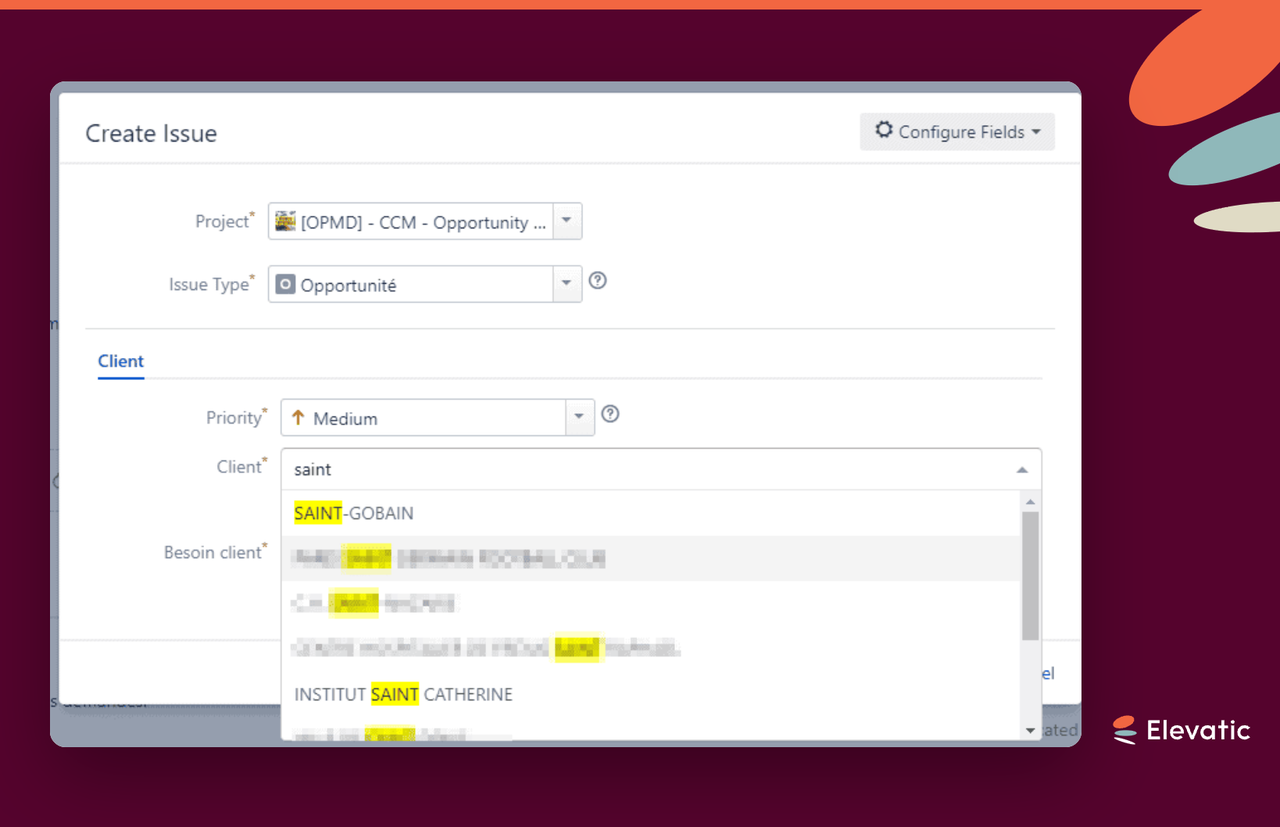
Elements Connect fetches data about the customer.
Then Elements Connect displays the client’s requirements. From here, several tabs show account information from the ERP in read-only mode. HTML and a scripting app customize how Elements Connect’s custom fields display.
How do you enforce data quality in an ERP from Jira?
If a required field is missing a value, Jira won’t let the user create the issue. The account manager will need to go into Boond Manager and add the missing data. Only then can they finalize the creation of the issue.
Using Jira and Elements Connect to manage the process and data availability allows OpenMinded to significantly improve the quality of data. Elements Connect avoids data duplication and saves end-users time by automatically populating the existing data in Jira.
How do you give sales and operational teams one view of an opportunity in Jira?
Once a sales rep creates an opportunity ticket, it becomes the single point of contact for business teams — who access both Boond Manager and Jira — and operational teams, who only use Jira day to day.
Elements Connect makes all the required information available from within Jira. There’s no need to toggle between tools or different modules in the same tool.
By using Elements Connect, operational and business teams have a 360° view of the opportunity
“Elements Connect is a versatile app,” says Tsuyoshi Shimabukuro. “One of the product’s key strengths is it allows you to manipulate data from several data sources to enrich Jira issues. You can customize the way you display this information to your users, which is a real bonus as using industry jargon within issues strengthens the adoption of Jira overall.”
What’s next for OpenMinded with Elements Connect?
Elements Connect has helped to make OpenMinded’s processes more robust and strengthen adoption of Jira by business users.
Feedback from management and users has been very positive. Productivity has increased and ERP data quality has improved. This has encouraged Tsuyoshi Shimabukuro and his team to pursue a data quality improvement initiative in order to secure and simplify the future migration from the company’s legacy ERP to a new one.
OpenMinded has more planned for Elements Connect: They want to to enrich issue tracking for security incidents with information from in-house databases and indicators of compromise (IoC) data sources. Elements Connect has the versatility to do this.
Has this story sparked your interest? Try Elements Connect today
Frequently asked questions
Couldn’t find what you need?
OpenMinded extended Jira, already used for ITSM, into opportunity management by configuring a dedicated workflow and pre-populating prospect fields with Elements Connect. Account managers track each opportunity as a Jira work item with a clear status and owner, something their ERP couldn’t enforce on its own.
Elements Connect makes ERP data available in Jira through custom fields. At OpenMinded the “Customer” and “Requirement” fields read directly from the ERP database, with a dependency so the requirement options change based on the selected customer. Several read-only tabs then display account context pulled from the ERP, avoiding data duplication and manual entry.
With Elements Connect, required fields prevent a user from creating the work item when critical data is missing. The account manager has to add the missing value in the ERP first, then finalize creation in Jira. This loop pushed OpenMinded’s ERP data quality up instead of letting gaps pile up.
Once an opportunity work item is created, it becomes the single point of contact for both business teams, who use the ERP and Jira, and operational teams, who only use Jira. Elements Connect surfaces all required information inside Jira, so neither team has to switch tools to get a 360° view.
Yes. OpenMinded customized the display of Elements Connect custom fields with HTML and a scripting app, presenting ERP data in qualification and financial tabs using the team’s own industry wording. Showing data in familiar jargon inside Jira strengthened adoption across business users.