

TL;DR
Automatic assignment: CNRS uses a hidden Elements Connect custom field to route each Jira Service Management request to the right team based on rules, with no manual triage.
Scale handled: The setup manages 140,000 users across 2,000 groups and 80 projects, showing only the groups actually assignable to each project.
SQL-driven field: One standard SQL query on an Elements Connect custom field resolves per project, fetching the user groups stored in the “Assignable Team” Jira role.
Delegated administration: Project admins manage their own group lists, so the Jira admin no longer configures options project by project.
Outcome: Fewer mis-assignments, faster resolution, and less maintenance for the Information Systems Division’s 120 specialists.
What does CNRS use Elements Connect for in Jira Service Management?
The CNRS, Centre National de Recherche Scientifique, is the French national network of 1,200 public research laboratories.
For a large public structure like the CNRS, support services are essential to make sure the thousands of researchers, technical, and administrative staff organized by geographical region, or delegation, can successfully use their budgeting software, make purchase orders, or process the thousands of applicants applying for open positions each year. Keeping such a large network of research laboratories and regional delegations running requires a well organized Information Systems Division of 120 specialists organized in functional teams.
Faced with an aging software solution that no longer met their needs to provide help desk services, Romain Deguil, head of the Identify, Access, and Development team within the CNRS Information Systems Division, helped the CNRS renew the solution they used. After comparing various solutions on the market, the CNRS chose Jira Service Management and Confluence to manage incidents, requests, and a catalog of services. Managing requests raised from 140,000 users belonging to 2,000 user groups would require more than the native options in Jira, which is why the CNRS decided to use Elements Connect with their Jira Service Management.
How do you route requests to the right team when you have 140,000 users and 2,000 groups?
The CNRS Jira Service Management has 80 projects corresponding to the various administrative software solutions or platforms used by 1,200 laboratories. Because of the geographical organization of the CNRS in local, regional, and national structures, 2,000 user groups for 140,000 users exist in a Master Data Management tool outside of Jira. “It was one of the difficult parts of the implementation, that there are so many groups of users and so many users,” explains Romain Deguil. The process of needs analysis revealed they would need an app to help manage assigning issues to specific groups from among the existing 2,000 user groups.
To assure correct assignment of requests, the CNRS configured hidden Elements Connect fields on the Jira Service Management customer portal.
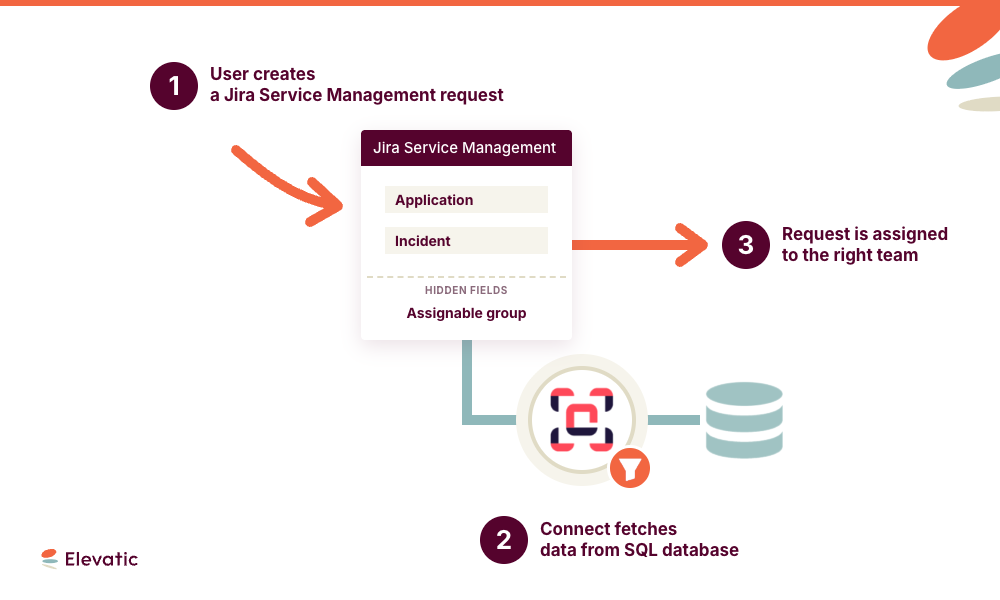
The Elements Connect fields include rules to automatically assign the issue to the relevant Information Systems Division based on the request type and other information. “We have 140,000 users who can’t possibly know who does what on the IT team. If they have a problem, it’s the Information Systems Division’s job to take care of the dispatching, the organization, and that’s what Elements Connect allows us to do,” continues Romain Deguil, explaining why the fields are hidden with automatic assigning.
How do you automatically assign Jira requests to the right user group?
Here’s how it works: JSM project admins add the user groups pertinent to the project they manage to the Jira role “Assignable Team”. On the JSM Customer Portal, a hidden Elements Connect custom field uses an SQL query to fetch the user groups available in the Jira role “Assignable Team”, and automatically assigns the request to one of those user groups based on rules configured in the Elements Connect field.
“With Elements Connect, we can fetch the groups we put in the roles to display them at the project level. It allows us to have a sort of “select group from project role. This allows us to display only the teams that can actually be assigned to a project, and not all the groups,” explains Romain Deguil.
The configuration of which user group to assign by default for each request type is set in the Project administration. In addition to saving time by automatically assigning the initial request to a team when it is raised, Elements Connect also reduces the risk of errors if the issue is transferred to another team, since only the teams that can actually be assigned to a project are displayed.
Without Elements Connect, all 2,000 user groups would be available, and
“With a simple mistake, you could assign an issue to all the members of a laboratory, for example, when in fact you needed to assign it to the Information Systems Division. Elements Connect allows us to limit the risks of mistaken assignment and the associated emails,” says Romain Deguil.
How do you delegate Jira list administration from the Jira admin to project admins?
Work around solutions like using a native select list as a substitute group picker require all the configuration to be done by the Jira admin and is particularly tedious, especially when the options have to be configured one by one for tens or hundreds of projects. Elements Connect helps delegate list administration by allowing the Jira admin to set up a standard SQL query for the Elements Connect custom field that applies to all projects, but fetches different data depending on the project.
“Elements Connect allows us to delegate the list administration to the Project admin, instead of the Jira admin,” explains Romain Deguil.
The project administrators for each Jira Service Management project configure which user groups apply to the project in question, add them to the role “Assignable team” for the project, and can modify the groups in the role whenever the need arises.
Combining the Jira functionalities of project roles and user groups with Elements Connect reduces the maintenance work required of the Jira admin, and puts the project administrator in the driver’s seat.
How does automatic assignment reduce errors in Jira Service Management?
With so many research laboratories, different kinds of software or incidents and users to coordinate in Jira Service Management, Elements Connect is key in helping the CNRS reduce errors and contribute to providing quality service. The Information Systems Division’s time is optimized by the correct assigning of issues right from the start, and the Jira Admin’s time is optimized by delegating list administration to the Project admins.
Looking to see the same benefits? Try Elements Connect today
Frequently asked questions
Couldn’t find what you need?
CNRS configures a hidden Elements Connect custom field on the JSM customer portal. The field runs rules that assign each request to the correct user group based on the request type and other data, so the Information Systems Division handles dispatching without the user needing to know who does what. This removes manual triage on incoming requests.
Project admins add the relevant user groups to the Jira role “Assignable Team”, and an Elements Connect custom field uses an SQL query to fetch only those groups for the project. The result works like a “select group from project role”: agents see only the teams that can actually be assigned to that project, not all 2,000 groups, which acts as a project-aware dynamic drop down list.
Elements Connect lets a Jira admin set up one standard SQL query on a custom field that applies to every project but returns different data per project. At CNRS the query reads the user groups stored in the “Assignable Team” role, pulling external group data into the field without duplicating it in Jira.
Because the Elements Connect SQL query is configured once and resolves per project, each project admin manages which user groups apply by adding or editing them in the “Assignable Team” role. The Jira admin no longer configures options project by project, which cuts maintenance and puts the project admin in control.
By showing only the groups assignable to a given project, Elements Connect prevents a request from being sent to the wrong group, such as an entire laboratory instead of the Information Systems Division. Correct assignment from the start saves agent time and avoids the mistaken-assignment emails that follow a bad routing.