

TL;DR
External data in Jira: Behaviour Interactive uses Elements Connect to pull HR data from MS SQL databases, an ATS API, and time-tracking software into Jira custom fields. No copy-paste.
No data duplication: Core data stays in SQL; Connect fetches only what each Jira field needs, so the source system remains the single source of truth.
Custom fields at scale: The HR workflow runs on 150+ Elements Connect custom fields, with a caching system to avoid overloading the database.
Employee records as work items: Each employee is a Jira work item; each contract or assignment is a sub-task, giving a full career history over time.
Valid-by-design dropdowns: JQL- and SQL-backed Connect fields populate dynamic dropdown lists, so users can only select valid values.
What does Behaviour Interactive use Jira and Elements Connect for?
Behaviour Interactive is a Canadian video game production studio, and they began using Jira to manage their HR onboarding processes and track career details of employees over time. Most of their core business data is maintained in SQL databases, and Elements Connect allows them to utilize that data when it’s needed in Jira for their HR processes. Elements Connect helped them save time by eliminating the need to duplicate data from centralized core databases.
App used:
Behaviour Interactive is a large video game production studio, based in Montreal, Canada, and dissatisfaction with their HR system several years ago led them to search for a better solution. They decided to use Jira to manage their on-boarding process and to track the assignments and career details of employees. Details related to the employee had to be copied and pasted from the Applicant Tracking System and the role and contract details copied and pasted from an external database. Behaviour Interactive looked into creating their own custom solution to fetch the data they needed from their SQL databases or external platforms, but confronted with the complexity of developing, testing and maintaining a custom app, they turned instead to the Atlassian Marketplace and chose Elements Connect.
What was the challenge: using SQL data for HR processes in Jira?
Nearly all of the core business processes and data for Behaviour Interactive are maintained in SQL databases and other services outside of Jira, and it was key for the company to be able to avoid having to convert or duplicate that data. As David Laperle, Head of Corporate Technology, explains “The beauty of Elements Connect, is that it allowed us to keep our core business structure of data where it was already, which is MS SQL. Our applications can still work the same way they did before, and we just plugged our HR process into the same source.” The HR processes in Jira use Elements Connect fields to fetch a large variety of data:
- information about recent hires from the Applicant Tracking System via API
- complex mapping information between functions and employees details from SQL core database
- the most up to date information on assignments for an employee from the time tracking software (after made available on the SQL database by a script)
- information from other JIRA projects via Connect JQL connector
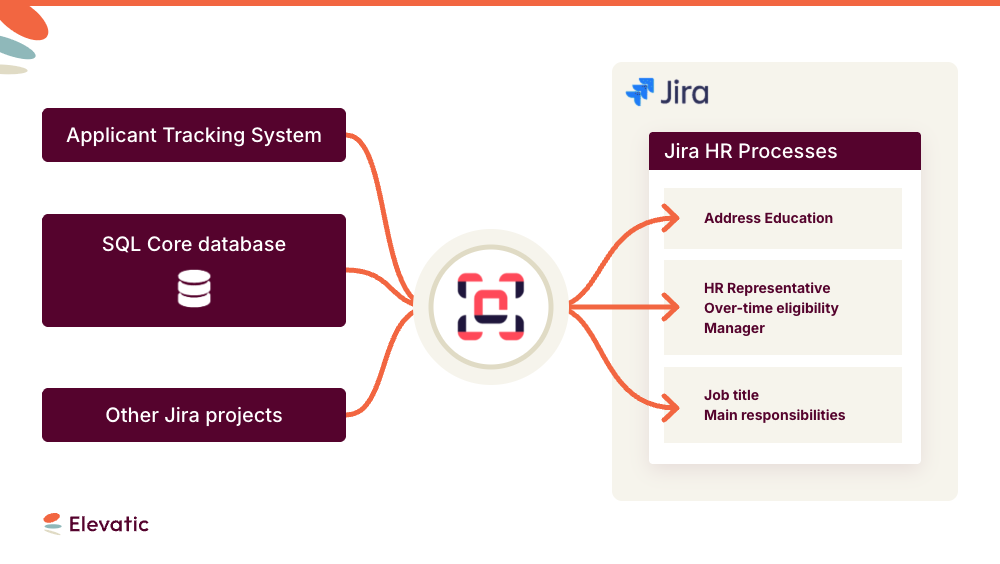
How does Behaviour Interactive fetch external data for its HR process?
HR processes used to be siloed, with different processes and platforms used for the recruitment process and then for the onboarding process. Before implementing Elements Connect with Jira, basic information like the employee’s address and education that had been entered into the recruitment system had to be copied and pasted into Jira when the person was hired. Now, recruitment is still done in an Applicant Tracking System, but data from the ATS is fetched by Elements Connect to display in Jira. David Laperle explains:
“We have a dashboard in real time in Jira about what is going on in the ATS. We can know which positions are open, which recruiters are working on those, and then when the recruitment is done we can start the onboarding process, which involves HR, IT and manager. When this is complete, it feeds automatically into the HR system in Jira. We kind of closed the whole loop so everything is done within Jira instead of having to use external tools.”
How is employee data structured in Jira?
Each employee is created as an issue, and their job assignments are created as sub-tasks associated with their main employee issue.
Once an employee has been created as a Jira issue, sub-tasks can be created to represent each job assignment or contract they’ve had. An employee who is promoted, changes to part-time status, or is offered an additional fixed term contract has another sub-task linked to their main issue. Within the sub-task, details concerning the job assignment (for example, the number of vacation days or whether or not the role allows over-time pay) are fetched by Elements Connect from an SQL database or an API. If the employee is promoted and moves to a different position or has a new contract, a new sub-task is created, which helps in the tracking of an employee’s career experience over time within Behaviour Interactive. This helps keep a history of salary information, as well as who the manager was at a certain date, and what the employee worked on. The status of the sub-tasks indicates whether the contract is currently active, or for the case of a permanent employee who is promoted, then the previous role is moved into the status “promoted”.
Which configuration options does Behaviour Interactive rely on?
Fetching external data is not the only feature Behaviour Interactive appreciates. Each employee issue includes an Elements Connect custom field to chose the HR representative who manages the contract. Set up as a JQL field, it fetches Jira users who are active and who have the title “HR Representative”.
“That way you can only select valid people,” explains David Laperle.
With over 150 Elements Connect custom fields configured, the caching system is the most appreciated feature for the team.
“When you search for all employees and you want to show 50 columns, it’s a lot of Elements Connect fields, and we use the caching system there to make sure we don’t overload the database,” explains David Laperle.
How does Elements Connect save time and reduce errors?
For Behaviour Interactive, there’s no reason to attempt updating fields by hand when the data is stored outside Jira because Elements Connect will do it faster and without any errors. It also saved them time by allowing them to leverage the data already available elsewhere instead of recreating it in Jira. “When we change the core data in our database, all our systems are reflected at the same time. The centralization of the core database for us was the most important because we didn’t want to have to sync data in custom fields. We needed a lot of Jira custom fields with drop-down lists, but we didn’t want to build those lists with code. That’s where Elements Connect saved us a ton of time: we could simply sync it with a SQL list and be done with it.” Elements Connect lets Behaviour Interactive keep their data where it is and just fetch what is needed for the HR workflow in Jira. Since the HR process is a bit unique, it was important to avoid impacting other processes.
With Elements Connect, they can bring all the data the need inside Jira without any data duplication or risk of errors, and save time in the process.
Looking to see the same benefits? Try Elements Connect today
Frequently asked questions
Couldn’t find what you need?
Yes. With Elements Connect, a Jira custom field can query an external MS SQL database and display the result directly in the work item. Behaviour Interactive uses this to pull role, contract and assignment data from its SQL databases into Jira, so HR teams see live data without copying records between systems.
Elements Connect fetches data on demand from the source system: an SQL database, an API, or another Jira project via JQL, and shows it in the Jira field rather than storing a copy. The source stays the single source of truth, so when the core data changes in the database, every connected Jira field reflects it at the same time.
Yes. Behaviour Interactive’s Connect fields pull recent-hire data from their Applicant Tracking System through its API, alongside data from SQL databases and time-tracking software. Elements Connect supports SQL, REST/API and JQL data sources for Jira custom fields.
Instead of hard-coding dropdown values, Behaviour Interactive backs Connect custom fields with an SQL list or a JQL query. The dropdown stays in sync with the database and, for JQL fields, only returns valid options, for example active Jira users with the title “HR Representative”.
Each employee is a Jira work item, and every contract, promotion or assignment is added as a sub-task linked to that work item. The sub-task status shows whether a contract is active or, for a promoted employee, moved to “promoted”, giving a full history of roles, managers and salary over time.