

TL;DR
Migrating from Atlassian Data Center to Cloud is more than a technical upgrade. Done right, it future-proofs your setup. Done carelessly, it opens security gaps you didn’t have before. With Data Center reaching end of life on March 28, 2029, migration is a question of when, not if – whatever your company size.
This post covers the five most common security mistakes companies make during an Atlassian Cloud migration, how to avoid them, and an FAQ for smaller teams migrating without a dedicated admin.
Why Security Matters in Atlassian Cloud Migration
Atlassian Cloud offers scalability, AI-powered features and less maintenance. But migration also requires rebuilding access, permissions and integrations, and that’s where attackers look. Verizon’s 2025 Data Breach Investigations Report found that a third of breaches at small and mid-sized businesses started with stolen credentials, and that breaches involving a third party have doubled to 30%.
The stakes are higher for regulated industries (finance, healthcare, public sector) and any company with data residency requirements. But smaller teams face a different risk: no one has a full-time security job. Atlassian Cloud supports frameworks like GDPR, SOC 2 and ISO 27001, but you need to intentionally configure the relevant controls; they aren’t all on by default.
Top 5 Security Mistakes (And How to Avoid Them)
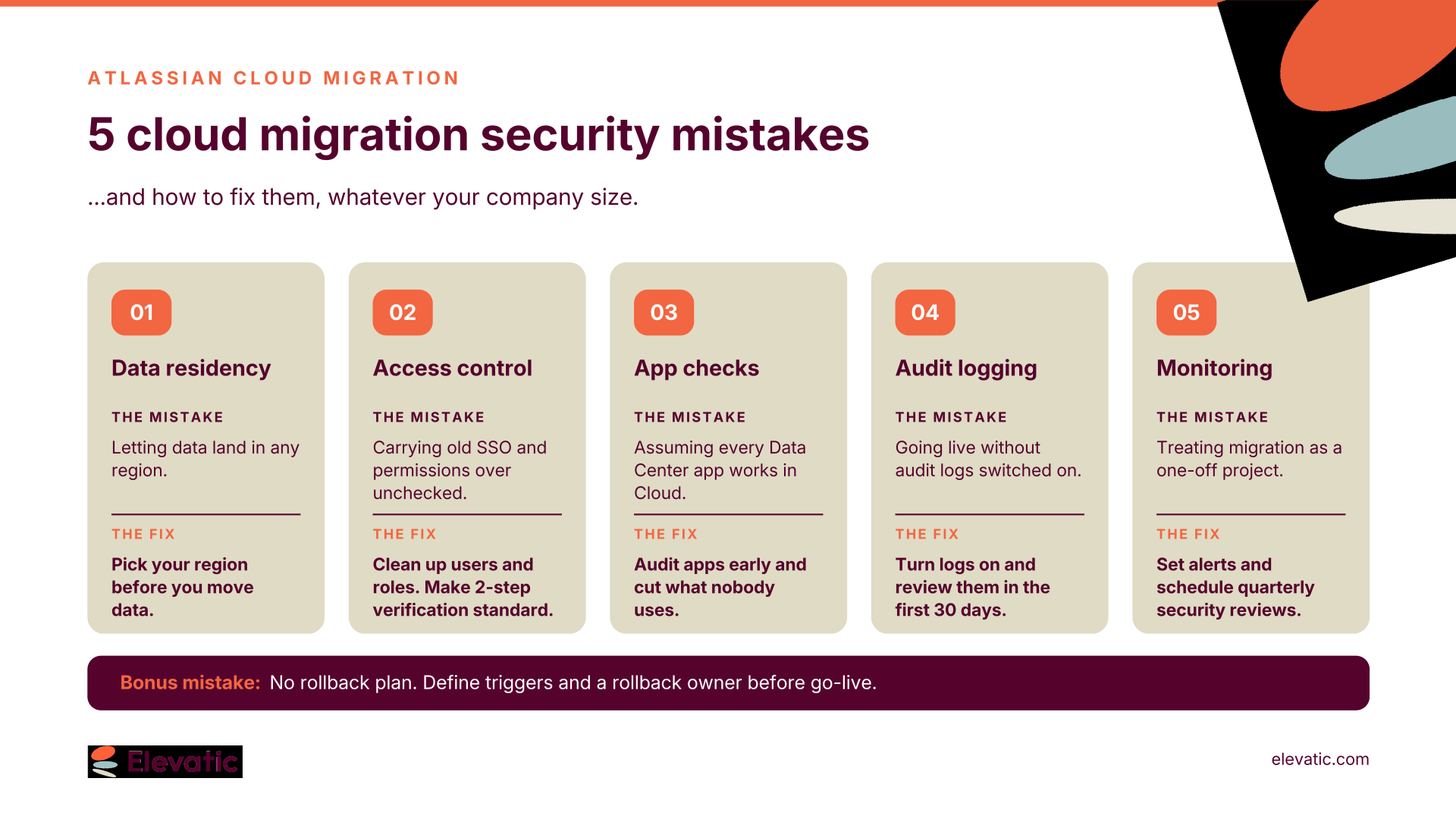
1. Underestimating Data Residency and Compliance Requirements
Mistake: Assuming all data can be stored anywhere, ignoring regional regulations like GDPR or HIPAA.
Real-Life Example: A European enterprise faced regulatory fines after migrating to Atlassian Cloud without ensuring data residency in EU-compliant regions. Their oversight led to sensitive customer data being stored in non-compliant servers, violating GDPR.
Solution:
- During setup, select the right data residency region. Atlassian now offers data residency in multiple regions, including the EU, but you must choose this up front.
- Consult Atlassian’s Cloud Compliance Roadmap to track upcoming certifications and ensure your migration timeline aligns with compliance deadlines.
- Engage legal and compliance teams early to map out requirements.
2. Overlooking Identity and Access Management (IAM) Gaps
Mistake: Failing to update IAM policies, leading to unauthorized access, locked-out users, or security breaches.
Real-Life Example: A global tech company experienced 12 hours of downtime during migration when legacy Single Sign-On (SSO) configurations weren’t updated for Atlassian Cloud. The result? Hundreds of employees couldn’t access critical tools.
Solution:
- Implement SAML SSO (Security Assertion Markup Language Single Sign-On) and Atlassian Guard for centralized user management and multi-factor authentication.
- Test IAM policies in a sandbox (Premium) or a separate test site before full migration.
- Audit user roles and permissions to ensure least-privilege access.
3. Skipping a Comprehensive App Compatibility Audit
Mistake: Assuming all Data Center apps will work in Cloud, only to discover critical gaps post-migration.
Real-Life Example: A financial services firm rolled back their migration after discovering their custom compliance app wasn’t cloud-ready. The delay caused lost productivity and emergency consulting fees.
Solution:
- Check Cloud alternatives to your Atlassian Marketplace Data Center apps.
- Plan for alternatives if key apps aren’t available in Cloud. Consider native Atlassian features or third-party integrations.
- Work with Atlassian migration partners to identify and test apps.
4. Neglecting Data Encryption and Audit Logging
Mistake: Not enabling encryption in transit/at rest or failing to set up audit logs for compliance.
Real-Life Example: A healthcare provider failed a HIPAA audit after migrating to the cloud without enabling organization-wide audit logging. This oversight led to a six-month remediation project and a large fine.
Solution:
- Enable Atlassian Guard for organization-wide audit logging.
- Standard and Premium include product-level audit logs; organization-wide audit logs require Guard.
- With Guard Premium, configure data security policies to control how users, apps, and external parties interact with content.
- Regularly review audit logs for suspicious activity, especially during the first 30 days post-migration.
5. Ignoring Post-Migration Security Monitoring
Mistake: Treating migration as a one-time event, not a continuous process.
Real-Life Example: A tech company suffered a data breach three months after migration because it did not monitor third-party integrations. The breach exposed customer records and led to a costly settlement.
Solution:
- Use Atlassian’s built-in security dashboards to monitor user activity, app integrations, and data access.
- Set up automated alerts for unusual behavior (e.g., multiple failed login attempts, unexpected data exports).
- Schedule quarterly security reviews to assess new risks and update policies.
Migration is just the beginning. Continuous monitoring is what keeps your cloud environment secure in the long run.
Bonus: The Mistake No One Talks About – No Rollback Plan
Mistake: Failing to define and test a rollback strategy.
Real-Life Example: A manufacturing firm lost 48 hours of productivity after a failed migration without a rollback plan. The incident delayed a major product launch and required emergency fixes.
Solution:
- Document rollback triggers (e.g., critical app failure, data loss, security breach).
- Test the rollback process in a staging environment.
- Assign a rollback owner to make swift decisions if needed.
Secure Your Atlassian Cloud Migration
Migrating to Atlassian Cloud is a big step for any company – and security mistakes can turn it into a risk. Plan for data residency, access management, app compatibility, audit logging and post-migration monitoring, and you’ll avoid costly pitfalls, whatever your company size.
Frequently asked questions
Couldn’t find what you need?
Yes – the mistakes are the same, the scale is smaller. A misconfigured permission or an unchecked app exposes your data whether you have 30 users or 30,000. In fact, Verizon found ransomware involved in 88% of breaches at small and mid-sized businesses. Smaller teams often carry more risk, because migration happens alongside everyone’s day job.
Name one person as migration owner and give them time for it. Before go-live, they should: clean up users and groups, review space and project permissions, decide which apps to keep, and make sure everyone signs in with a company account. Check data residency before you migrate your data.
Standard includes product audit logs and data residency. Premium adds a sandbox for testing changes and apps; on Standard, run a test migration into a separate cloud site instead. SAML single sign-on, automatic user provisioning, enforced authentication policies such as mandatory two-step verification, and organization-wide audit logs come with Atlassian Guard, a paid add-on (included with Enterprise).
Smaller instances with few apps and standard permissions are often migrated in-house with Atlassian’s free migration assistants. A partner pays off when you have custom apps, complex permission schemes, compliance requirements – or simply no one with time to own it.