

TL;DR
The native action: “Elements Copy & Sync – Run a recipe” runs a clone or sync recipe from any Jira Automation rule, without an API token or a web request.
Clear roles: Jira Automation decides when something happens, and Elements Copy & Sync decides how related work items are created, mapped and kept in sync.
When to use each: Jira Automation fits simple event-based actions, while Elements Copy & Sync fits processes that need reliable field, comment, attachment or cross-instance sync.
Admin control: each recipe can be made available or not to Jira Automation, and every run appears in Copy & Sync logs with the “Automation” trigger type.
No migration needed: existing rules based on “Send web request” keep working, so teams can switch to the native action at their own pace.
Jira Automation can clone an issue, but a Jira clone issue process that also copies attachments, maps fields, syncs comments or reaches another Jira instance quickly turns into a web of rules. Elements Copy & Sync now adds a native action to Jira Automation, “Elements Copy & Sync – Run a recipe”, so admins can combine both tools without API tokens or web requests. Jira Automation handles the trigger and conditions, and a Copy & Sync recipe handles the copy and the synchronization. The story below shows when each tool fits and how they work together.
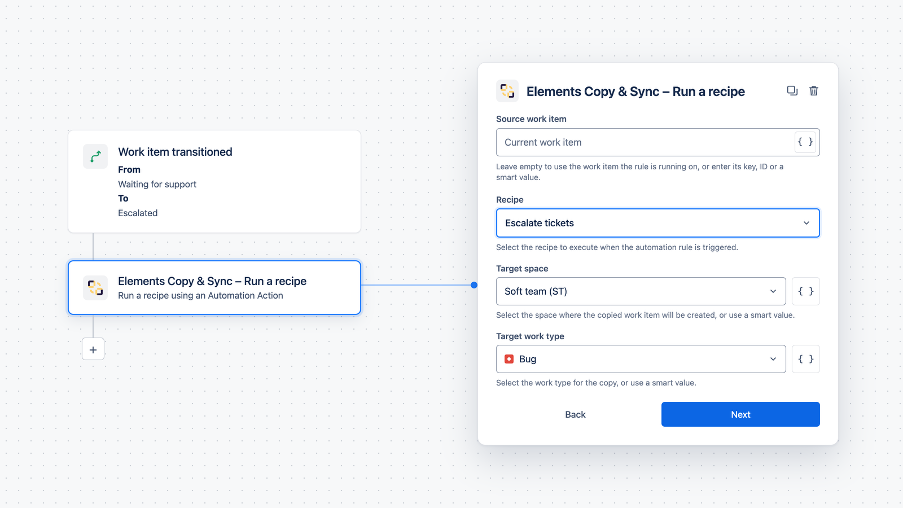
Why did a simple escalation rule stop working?
Sofia is the Jira admin of an IT services company. Her support team, led by Marcus, escalates customer requests from Jira Service Management to Lena’s engineering team. A year ago, Sofia automated the escalation: a Jira Automation rule sends a web request to the Elements Copy & Sync REST API, which runs the “Escalate to engineering” recipe.
The setup worked, but it relied on an API token created by a former admin. When his account was deactivated, the token stopped working, and escalations stopped with it. Nobody noticed for three days, until Lena asked why her backlog was so quiet.
| Step in Sofia’s previous rule | What could go wrong |
| Create an API token | Tied to one person’s account |
| Configure an actor in Elements Copy & Sync settings | One more setting to keep up to date |
| Add a “Send web request” step with the recipe URL | URL copied by hand, easy to break when a recipe changes |
| Maintain the rule over time | Hard to troubleshoot for admins who do not work with APIs |
How do you run an Elements Copy & Sync recipe from Jira Automation without API tokens?
Sofia rebuilds the rule with the native action. In Jira Automation, she goes to Actions, then Other apps, and selects Elements Copy & Sync – Run a recipe.
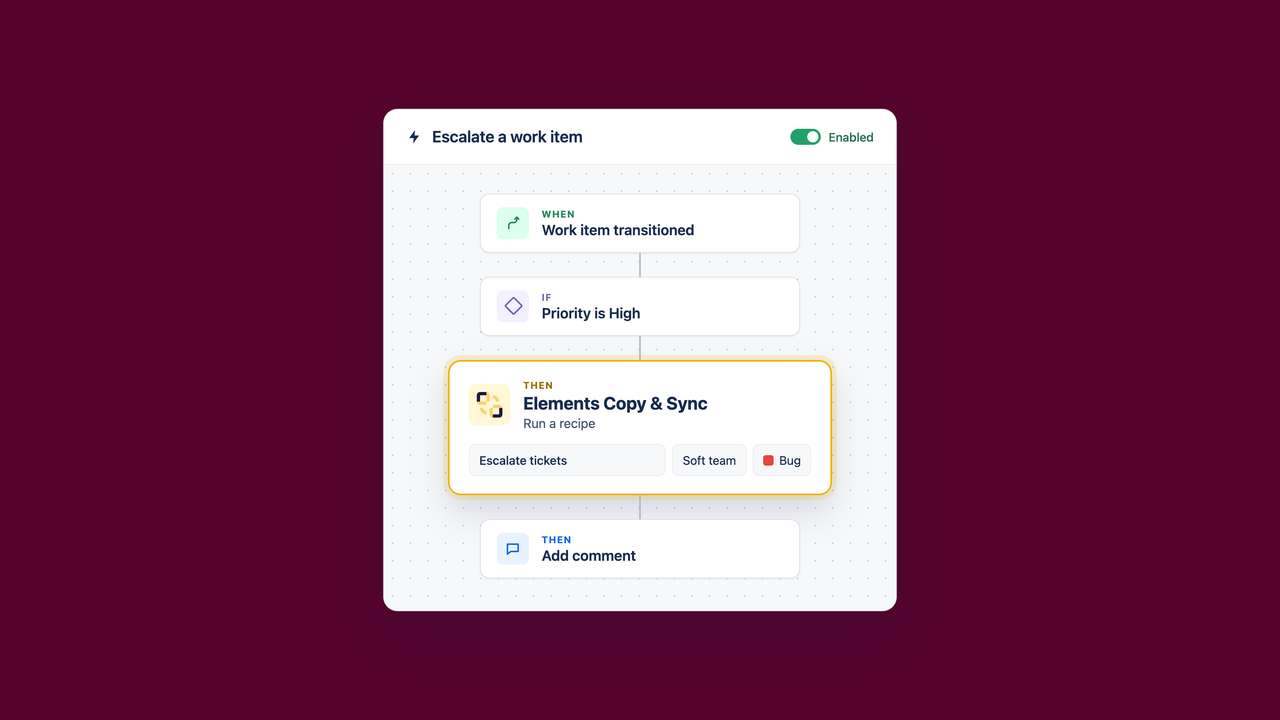
She connects Elements Copy & Sync to Automation once, and the configuration fits in one dialog.
| Setting | Options | Sofia’s choice |
| Source work item | Current work item, a fixed key, or a smart value such as {{issue.parent.key}} | Current work item |
| Recipe | Any active recipe, from a dropdown | Escalate to engineering |
| Target space and work item type | From the recipe, from a list if the recipe allows several targets, or dynamic with smart values | Engineering space, Bug |
The rule now runs as the current user or as the rule actor, not through a token stored in Elements Copy & Sync settings. The guide to trigger recipes with Jira Automation details each setting.
Can one rule send work items to different spaces?
Lena’s team splits into two squads, mobile and backend, each with its own space. Sofia does not want two rules, so she uses dynamic targets. The recipe allows both spaces, and a smart value in the action picks the right one based on the Component field of the request.
| Component on the JSM request | Target space chosen by the action |
| Mobile app | MOB |
| API, Backend | API |
There is one guardrail: smart values can only select targets the recipe already allows. A rule cannot send work items to a space that the recipe owner did not approve. Because the recipe runs automatically, no creation dialog appears, so the target must be known before the rule runs.
What else can you automate by combining Jira Automation and Elements Copy & Sync?
Marcus sees the escalation working and asks for more. Every Jira Automation trigger can start a recipe, and one rule can chain several Copy & Sync actions.
| Need | Jira Automation trigger | Elements Copy & Sync recipe result |
| Incident escalation | Work item created with high severity | A linked, synchronized bug in the engineering space, with context and attachments |
| Change or onboarding approval | Work item transitioned to Approved | Linked tasks in the IT, HR and Security spaces, with synchronized statuses |
| Cross-instance escalation | Condition met on a customer request | A work item created in a partner’s or subsidiary’s Jira instance through a remote recipe |
| Recurring bulk copy | Scheduled rule with a JQL query | A Jira bulk clone of every matching work item, on a fixed schedule |
For onboarding, see how teams create onboarding work items in Jira with Elements Copy & Sync. When the two teams use different select values, a recipe can also map values between different select fields during the copy.
Should you use Jira Automation, Elements Copy & Sync, or both?
Sofia’s rule of thumb is simple: the more a process depends on accurate handoffs between teams, the more it belongs in a recipe. The question is not only whether Jira Automation can build it, but whether the team can maintain it safely as the process evolves.
| Criteria | Jira Automation alone | Elements Copy & Sync with the native action |
| Typical use | Update a field, assign, transition, notify, scheduled hygiene rules | Create, clone, escalate or synchronize related work items |
| Rule design | Readable while the process stays small | Process stays readable as it grows: Automation decides when, the recipe decides how |
| Fields, comments, attachments, links | Possible with branches, smart values and extra rules | Configured once in the recipe |
| Different fields or contexts | Requires translation logic in rules | Handled by recipe mapping, including value mapping |
| Ongoing synchronization | Requires additional rules and loop prevention | Built into the recipe for linked work items |
| Other Jira instances | Requires web requests between sites | Supported with remote recipes |
| Data visibility between teams or companies | Managed rule by rule | Controlled in the recipe |
| Cost over time | Rule design, testing, execution volume and troubleshooting grow with complexity | Fewer rules to maintain, with logs for every run |
In practice, Sofia keeps Jira Automation for notifications, assignments and approvals. She uses Elements Copy & Sync whenever copying, escalation, synchronization or templating is a core business process, and combines both when a trigger should start a recipe. For a closer look at native limits, read about Jira Automation rules, limits and Jira sync.
How do admins keep control over automated recipes?
Sofia is responsible for every recipe, so she wants to know which ones can run from Automation and what happens when they do. Elements Copy & Sync gives her three controls.
| Control | Where | What it does |
| Recipe availability | Recipe, Triggers tab, “Jira Automation actions” | Allows or blocks a recipe in Automation; enabled by default for new and existing recipes |
| Execution logs | Copy & Sync activity logs | Records every run with the “Automation” trigger type |
| Error reporting | Copy & Sync logs and Jira Automation audit log | Shows a failed run in both places |
The next time a run fails, Sofia sees it in the activity logs of Elements Copy & Sync the same day. Lena no longer has to notice an empty backlog to raise the alarm.
What happens to existing web request rules?
Nothing breaks. Rules based on “Send web request” keep working, so Sofia migrates her rules one by one, starting with the most critical escalations. The REST API also remains the right option to trigger a recipe from an external tool or script.
| Method | Best for |
| Native Jira Automation action | Rules built inside Jira, by any admin who can create a basic rule |
| REST API | External tools, scripts and integrations outside Jira |
| Manual trigger or workflow post-function | Agents choosing a recipe on demand, or a copy tied to a workflow transition |
The native action also adapts automatically if the instance’s data residency location changes, which a hard-coded web request URL does not. You can watch the interactive demo of the new action to see the setup on screen.
Which edition and hosting do you need?
The native Jira Automation action is available for Elements Copy & Sync on Jira Cloud. It works with local recipes in the same instance and remote recipes across instances.
| Item | Detail |
| Hosting | Jira Cloud |
| Action name | Elements Copy & Sync – Run a recipe |
| Recipe types | Local and remote |
| Runs as | Current user or rule actor |
| Release date | October 13, 2026 |
Recipes, triggers and logs are managed in one place for every team.
Frequently asked questions
Couldn’t find what you need?
Yes. The native “Elements Copy & Sync – Run a recipe” action is available in Jira Automation under Other apps. You select a recipe, a source work item and a target, and any Automation trigger can start it, including work item created, transitioned, manual or scheduled rules with a JQL query.
No. The native action runs as the current user or as the Automation rule actor, with no API token, no web request and no actor to configure in Copy & Sync settings. Admins connect Copy & Sync to Jira Automation once, then use the action in any rule they build.
No. The two tools are complementary. Jira Automation decides when something happens through triggers, conditions and schedules. Elements Copy & Sync decides how related work items are created, mapped and kept in sync, including comments, attachments, links and work items in other Jira instances.
Yes. A recipe can allow several target spaces and work item types, and the action can pick one with smart values, for example based on the Component field. Smart values can only select targets the recipe already allows, which keeps control in the hands of the recipe owner.
Yes. Rules that call the Copy & Sync REST API through “Send web request” keep working as before, so teams can migrate to the native action gradually. The REST API also remains available to trigger recipes from external tools or scripts outside Jira.
Key takeaways
- The native action lets any admin who can build a basic rule run a Copy & Sync recipe, without tokens or web requests.
- Jira Automation decides when, and Copy & Sync decides how related work items are created, mapped and synchronized.
- Simple actions belong in Jira Automation, while processes built on reliable handoffs belong in a recipe.
- Recipe availability, the “Automation” trigger type in logs and errors in both audit trails keep admins in control.
Next step: pick the rule in your instance that relies on a web request or on the most branches, and rebuild it with the native action after you try Elements Copy & Sync free on the Atlassian Marketplace.