

TL;DR
Clone Jira tickets across projects: Bonduelle copies a Jira Service Management request into the right team’s project with one pre-configured Elements Copy & Sync button.
Automatic comment & status sync: Comments and statuses sync back to the original request, so employees track progress without emails or phone calls.
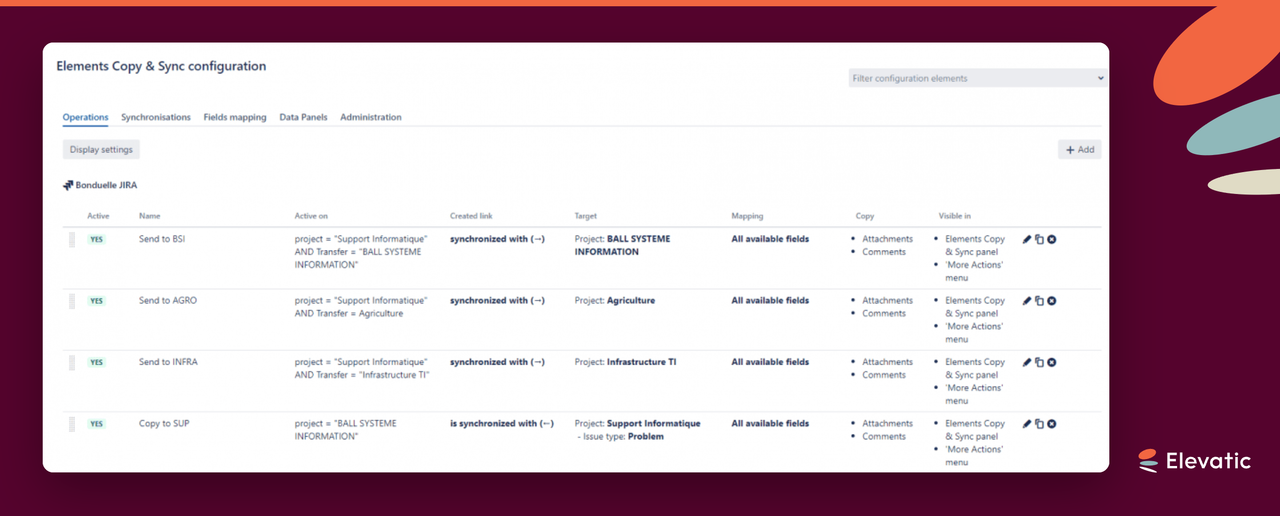
Four copy operations: Four pre-configured operations route requests to the correct project, such as Infrastructure.
Flexible field mapping: Fields map and sync even when teams name them differently, so nothing has to be renamed across projects.
Scales beyond IT: After success in IT, Bonduelle is extending Jira Service Management and Elements Copy & Sync to teams like HR.
Bonduelle runs its North American IT support on Jira Service Management, serving 2,000 employees in Canada. Many requests need a second team to act, so Bonduelle uses Elements Copy & Sync for Jira issue sync: a pre-configured button copies a request’s fields to the right project, and comments and statuses sync back automatically. The person who raised the request sees progress in the portal without a call or email, and agents don’t update the same work item twice. The setup was quick and needs little admin upkeep.
What does Bonduelle use Jira and Elements Copy & Sync for?
Bonduelle is a well known brand on the supermarket shelves, especially in the canned food aisle. But beyond preparing quality food, they also have IT systems to manage, access requests to process, and equipment to manage. In order to improve the efficiency of the service to the 2,000 employees based in Canada who needed to raise requests with the IT department, Bonduelle implemented Jira Service Management. To save time on repetitive or standardized tasks, the company added Jira apps Elements Copy & Sync and Elements Checklist to automate common tasks and notifications. Now the IT team can focus on resolving the requests, and employees get the information they need.
App used: Elements Copy & Sync
For shoppers in many countries, the Bonduelle brand is synonymous with vegetables: canned, frozen, or prepared fresh salads. But getting those vegetables from the field to the supermarket shelf requires the work of multiple teams, and invariably there are problems and questions about accessing software, network printers, or shared files, and an efficient solution is needed to manage those requests sent to the North American IT department.
Previously using an internally developed tool, the Canadian division worked with Atlassian Solution Partner Valiantys to set up an internal Jira Service Management to manage requests raised by the 2,000 employees. During the needs assessment phase, Valiantys recommended implementing Elements Copy & Sync in order to improve the functionality of Jira Service Management and help the IT department resolve requests more easily. Thus far, the feedback from agents and users has been unanimous: Elements apps automate and streamline the Jira Service Management to make everything simpler.
What was the challenge: implementing Jira Service Management at Bonduelle?
Bonduelle started the process of implementing Jira Service Management and Jira approximately a year ago, first implementing it within the IT department. This allows them to more efficiently manage requests raised for common problems with hardware, software, network issues, printers, or passwords. Employees and IT staff have found that Jira Service Management with
Elements Copy & Sync really help automate a large part of the process of communication and managing issues, and projects are underway to expand the use of Jira to more departments, such as Human Resources.
The number of Support Agents and Jira users in general is small for the moment, and IT staff work on issues in addition to their other responsibilities, which meant the Jira Service Management configuration needed to streamline the issue management process as much as possible. The IT managers cannot dedicate all their time to administrating Jira as well, which means any configuration or instance upkeep had to be simple and easy to configure.
How does Bonduelle automate work item management across projects?
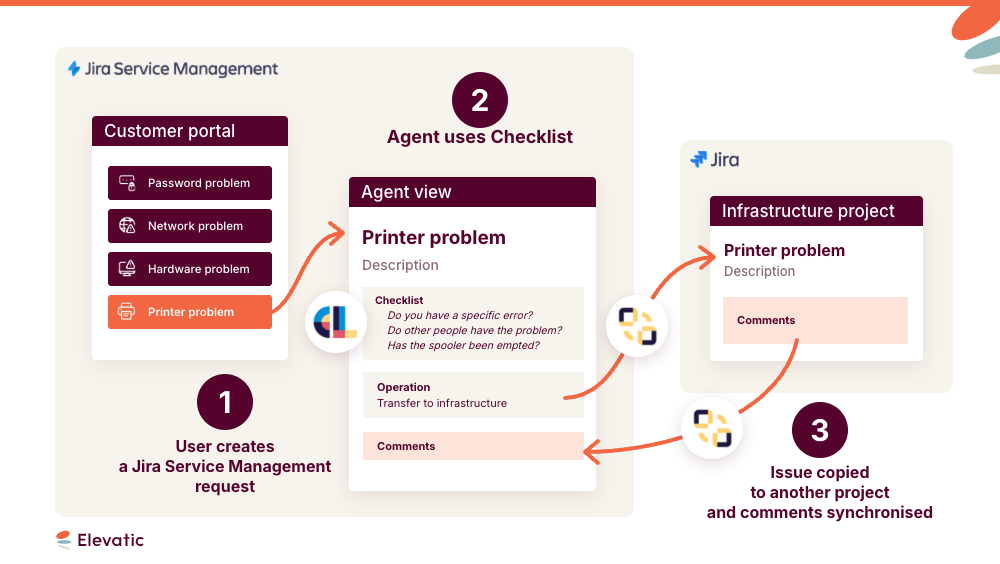
Many of the requests raised in Jira Service Management require work to be done by another Bonduelle team, and the native functionalities in Jira Service Management don’t allow for these requests to be transferred to different projects. To create an issue in the project where the right people can get to work resolving the issue, Bonduelle uses an Elements Copy & Sync operation to copy all the relevant fields from the issue in Jira Service Management to a new issue in the relevant Project with a minimum of manual manipulation. For example, if the request raised needs input from the Infrastructure team, using the pre-configured Elements Copy & Sync button copies the issue to the Infrastructure project.
“Elements Copy & Sync was easy to configure. What is really useful is that it’s not necessary to have the same name for the fields you want to map and synchronize between projects, since not every team uses the same term. It’s very convenient and flexible.” – Jira Admin Martin Lalonde
How does Bonduelle sync comments and statuses between projects?
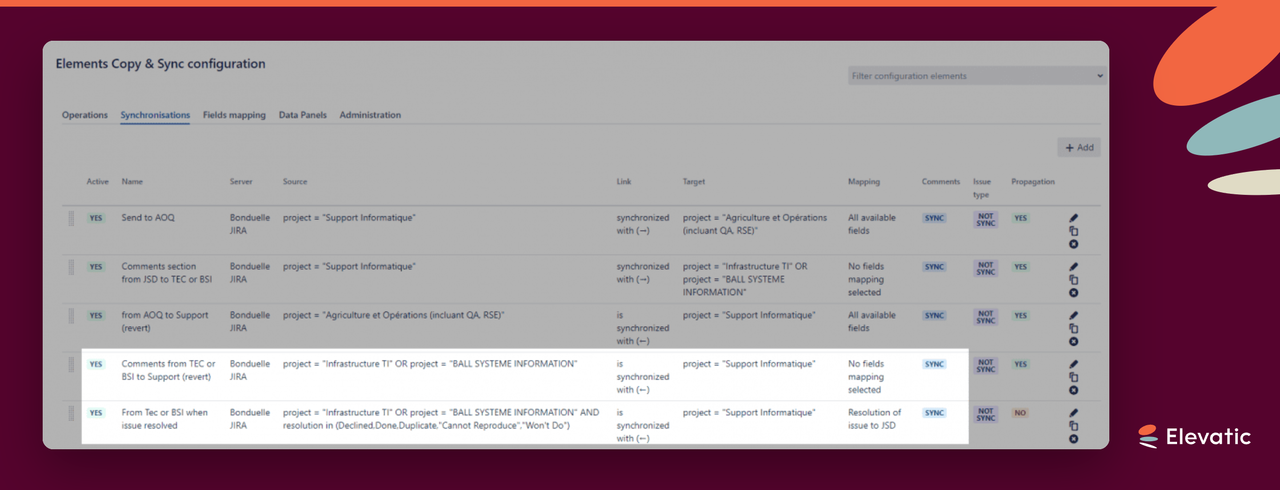
In addition to copying fields with important data about the issue to resolve, Elements Copy & Sync allows for the syncing of comments and statuses. Comments made by the Infrastructure team are copied to the original Jira Service Management Request, meaning the employee who raised the request is automatically informed of the comment. Martin Lalonde has seen an immediate benefit of this syncing:
“By having the comments automatically copied, it allows us to streamline some tasks. Instead of having to email or phone someone, they can see on the JSD portal the progress of their request.”
When the Infrastructure team closes the work item, another Elements Copy & Sync operation updates the resolution field in Jira Service Management. The employee again sees their request’s progress automatically, and the Infrastructure team member avoids updating multiple work items.
How does Jira issue sync save the IT team time?
Jira Service Management with Elements Copy & Sync lets Bonduelle focus on resolving work items. It provides a structured interface to collect the right information and get the right people on the job. With Jira issue sync, the Elements apps handle all the automation — easy to configure and flexible enough for Bonduelle’s processes. Martin Lalonde has no doubt about the added value of Elements Copy & Sync:
“The biggest advantage? The automation. It makes Jira easier and faster, so you can spend time on the issue and not trying to create more issues in Jira. Elements Copy & Sync was easy to put in place.”
Based on the successful adoption of Jira Service Management for the IT department, Bonduelle plans to expand their use of Jira to non-technical teams. The easy automation and flexibility provided by Elements Copy & Sync mean business teams can focus on the work, and Jira Admins can rest assured that users won’t have to do any tricky manipulation.
Has this story sparked your interest? Try Elements Copy & Sync today
Frequently asked questions
Couldn’t find what you need?
Jira issue sync keeps two linked work items aligned across projects — when fields, comments, or statuses change on one, the other updates automatically. At Bonduelle, Elements Copy & Sync syncs a Jira Service Management request with the copy created in the resolving team’s project, so both stay current without manual updates.
Yes. Bonduelle uses a pre-configured Elements Copy & Sync button to copy a request’s relevant fields from Jira Service Management into the correct project. For example, the Infrastructure project, with minimal manual input, so the right team can start work immediately.
With Jira issue sync in Elements Copy & Sync, the resolving team’s comments flow back to the original Jira Service Management request. The employee who raised it gets updates automatically and tracks progress in the portal, instead of waiting on an email or phone call.