

TL;DR
Advanced Panelboxes for Confluence is now powered by Atlassian Forge, delivering a refreshed settings experience, automatic migration of your custom colors to Atlassian design tokens, and a brand-new Advanced Panelboxes macro with expandable panels, multiple design options, and advanced settings. Your existing Panelboxes and content carry over unchanged. Manual update required: go to Manage Apps → Advanced Panelboxes → Update by the end of September to unlock the new features.
What’s New in Advanced Panelboxes
You’ve standardized your Confluence panels for a reason. The “red” box means one thing, the “blue” box means another, and every team uses them the same way — because an admin defined them once and everyone just picks from the list. This release keeps that simplicity intact and makes the panels themselves better: more consistent, more flexible, and more engaging to read. Your existing Panelboxes, configured styles, and content all carry over.
Introducing the New Advanced Panelboxes Macro
The headline addition for content authors is the new Advanced Panelboxes macro. It keeps the pick-a-predefined-style approach that made the app popular and adds real flexibility on top:
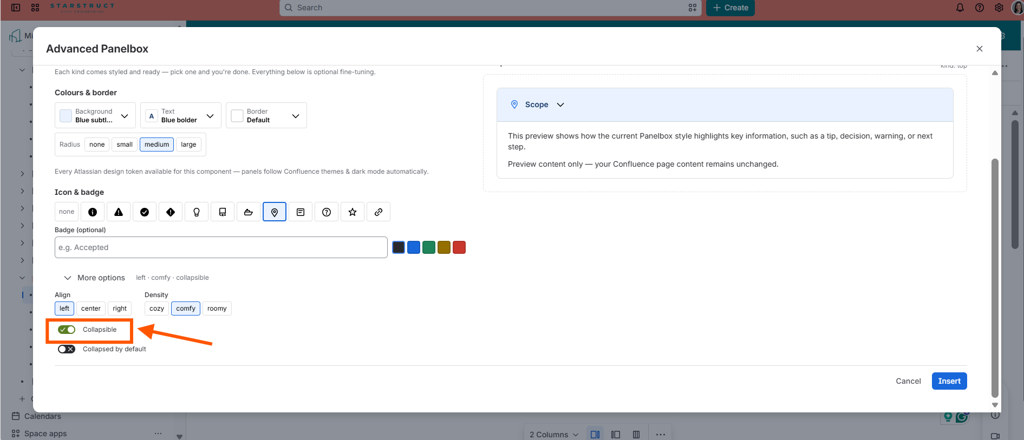
- Expandable panels — collapse and expand content so authors can pack more into a page without overwhelming the reader. Reference material, optional detail, FAQs, and step-by-step guides become easy to scan, with readers opening only what they need.
Multiple design options — a wider range of predefined styles to signal the type of content in a box (a caution, a tip, a highlight) while staying inside the guardrails an admin sets.
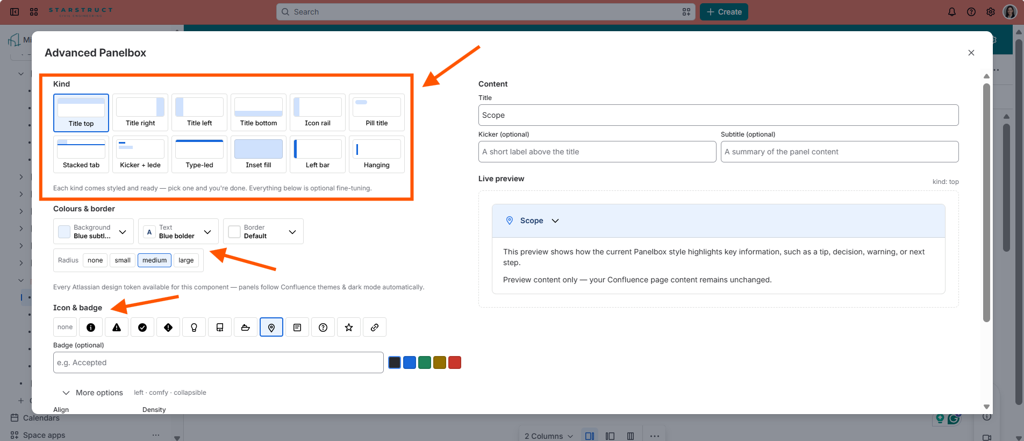
Advanced settings — finer control over how each panel behaves and displays, so you can build clearer, more engaging pages without pushing macro complexity onto everyday authors.
The design philosophy hasn’t changed — admins configure the options centrally, authors simply choose. What’s new is that the choices are richer and the resulting pages are more interactive.
Key Benefits of Advanced Panelboxes on Forge
1. Panels That Match Your Confluence Theme — Automatically
Your existing custom colors are automatically migrated to Atlassian design tokens, the shared styling values Confluence uses across the product. The visible payoff: your panels now look right in both light and dark mode. Instead of a hardcoded color that clashes when a reader switches themes, each panel adapts to the surrounding page — your corporate design stays intact and stays legible for every reader, with no manual rework.
2. A Cleaner Settings Experience
The refreshed settings experience gives admins a cleaner look and feel for the configuration screens where the app’s real power lives. Defining a panel style once and applying it everywhere is now easier to navigate — an outsized payoff for the admins who manage panel styles across the instance.
3. A More Secure, Future-Ready Foundation
Because the app now runs on Forge — inside Atlassian’s secure cloud infrastructure — you also get stronger security, better data-residency alignment, and full compatibility with future Confluence updates. In short: the same app you already trust, ready for where Atlassian Cloud is going.
Why This Matters for Confluence Teams
The Advanced Panelboxes Forge release is a genuine upgrade for teams that care about clear, consistent content:
- Panels that stay on-brand across light and dark themes
- More flexible, interactive pages with expandable content
- A cleaner admin experience for managing panel styles
- Stronger security and a foundation built for future improvements
The design philosophy hasn’t changed — admins configure the options centrally, authors simply choose. What’s new is that the choices are richer and the resulting pages are better.
Ready to Upgrade?
The Forge version of Advanced Panelboxes is available now. This upgrade requires a manual update and will not activate automatically. Remember to update by the end of September.
- For existing customers: navigate to Manage Apps → Advanced Panelboxes → Update to get started. Your existing Panelboxes and content carry over unchanged.
- For new users: Try Advanced Panelboxes for free and bring consistent, theme-aware panels to your Confluence Cloud instance today.
Have a technical question about your specific configuration, or do you want to know more about this app? Talk to the Elevatic team.