

TL;DR
Who: ETAM group, a French leader in lingerie (6,200 employees, 1,378 outlets across 55 countries, brands Etam, Undiz, 123), manages the full life-cycle of its retail stores.
Jira project management at scale: ETAM runs store openings, renovations, and closings in Jira with Elements Connect and Elements Copy & Sync, replacing Excel.
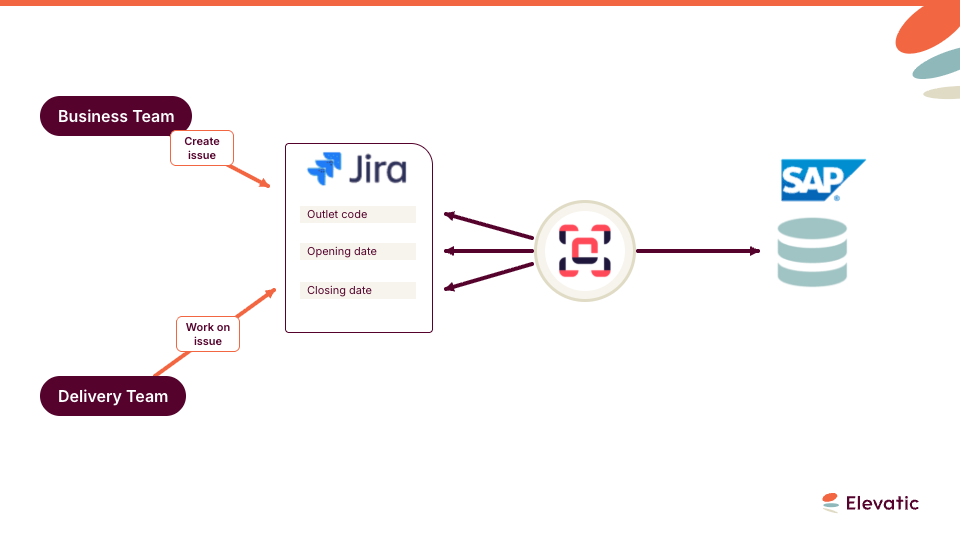
External data in Jira: Elements Connect injects ERP data (outlet code, opening and closure dates) into the project manager’s work item, so teams don’t maintain two databases.
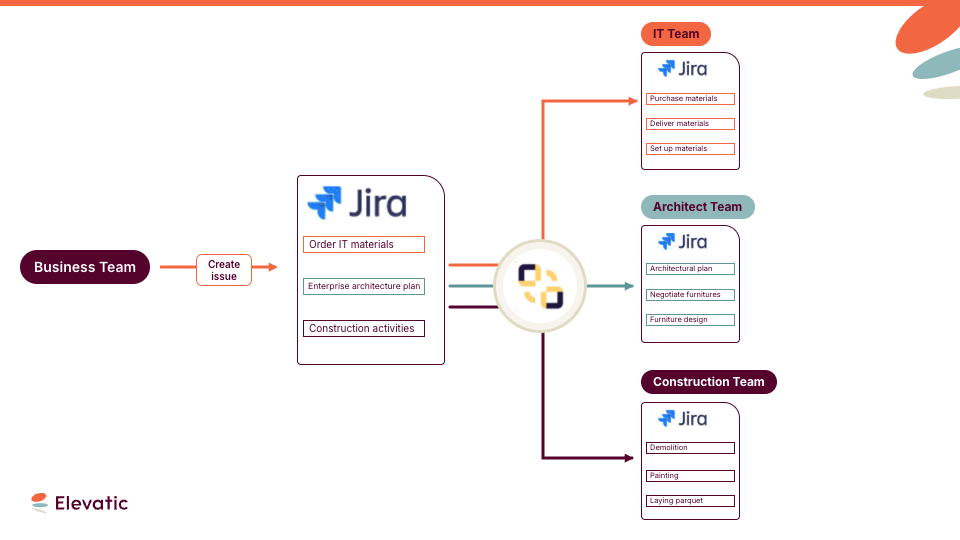
Auto-created tasks: From one master work item, Elements Copy & Sync creates, links, and assigns all ~300 tasks per project to the right stakeholder, who gets notified.
Outcome: On-time openings and a 70% drop in on-site blocking difficulties, now being extended to collection design and e-commerce projects.
ETAM needs to renovate more than a hundred stores each year. When a store closes for renovation, employees have only 40 days to renovate it. Every hour of delay costs the company money, so all tasks have to be completed on time. Every day, managers and employees ask themselves: How can we assign all the tasks and stay up to date with the overall progress and milestones of our project? Are we forgetting anything? Have all the necessary items been delivered? Such fast-paced environments require efficient project management and logistics, and these projects are difficult because of their short, fixed deadlines – but working faster increases the potential for mistakes. ETAM was well aware of these problems, which is why they decided to streamline the management of stores’ opening, renovation and closing, and chose Jira and Elements apps to do so. They used Elements Connect to bring data from their external ERP software inside Jira, and Elements Copy & Sync to create, copy and link issues related to store management and assign each task to the right person at the right time.
How do you open and renovate retail stores on time with Jira
Previously, ETAM used Excel to manage projects, but the results were not as desired. “93% of outlets had issues preventing the opening to the public on the expected date” says Maurcio Galavez, Senior Information Technology Business Analyst at ETAM. These issues directly affected not only the company’s revenue, but also its image. Delays in store openings could be caused by many factors: A broken printer might stop daily reports bring submitted to head office, or someone might forget to order a new ADSL line. Such projects are like a house of cards: when one falls down, the entire project can collapse. To avoid such catastrophes, the entire path of a project has to be easily traceable – which means automated.
How do you bring ERP data into Jira work items with Elements Connect?
ETAM decided to use Elements Connect to populate their Jira tickets with key data, and ERP data was made available in Jira via the app. At the beginning of the project, Elements Connect automatically injects the project manager’s Jira ticket with the outlet code, as well as the opening and closure dates. Using Elements Connect to fill in Jira tickets means users no longer need to maintain data inside two different databases, decreases the risk of errors when changes are made. Here’s how Elements Connect worked in this particular case:
How do you auto-create and assign hundreds of tasks in Jira?
Renovating stores involves a lot of stakeholders:
- Regional managers in charge of placing orders to IT
- Architects working on the stores’ design and furniture
- The IT department, responsible for purchasing the stores’ PCs, cellphones, checkout counters, etc., as well as their delivery and setup
- Construction teams working onsite
- Project managers coordinating the projects.
Coordinating, following-up and assigning each task to its proper stakeholder is critical: One single mistake can snowball and impact the entire project. Before moving to Jira and Elements Copy & Sync, it was a nightmare for project managers to keep on top of everything and move the project forward. Now, all stakeholders use Jira to report on their progress; and because all renovation projects involve the same basic tasks ETAM uses Elements Copy & Sync to automate the creation of issues tracking all these tasks. When a project manager creates a master ticket for a renovation project, Elements Copy & Sync automatically creates, links and assigns all the hundreds of issues crucial to the project to stakeholders, so they know exactly what is expected of them.
“With Elements Copy & Sync and Jira, all 300 tasks necessary to each project are automatically created and assigned to the right person who receives a notification,” says Mauricio Galavez. “This process improves our efficiency and allow us to open the stores on schedule.”
What results did ETAM get, and what’s next?
The adoption of Jira and Elements apps has been vital for ETAM – structuring and automating their renovations and grand opening processes had a huge impact on the performance of the teams in charge of these projects.
“Jira allowed us to reduce blocking difficulties on construction sites by 70%” says Mauricio Galvez.
And this dramatic reduction had a positive effect on the company’s image and finances. As a result, ETAM now plans to use the same tools and approach on other projects. For instance, they are planning to leverage the power of Jira and Elements apps to streamline the process of designing their future collections, and the process of updating their e-commerce website.
Looking to see the same benefits? Learn more about our apps
Frequently asked questions
Couldn’t find what you need?
ETAM runs each store project in Jira instead of Excel, which previously left 93% of outlets with issues blocking on-time opening. A project manager creates a master work item, and Jira tracks every task, owner, and milestone across regional managers, architects, IT, construction, and project managers in one place.
Elements Connect makes ERP data available in Jira and automatically populates the project manager’s work item with key values such as the outlet code and the opening and closure dates. Because the data is read from the ERP, teams no longer maintain it in two systems, which lowers the risk of errors when something changes.
Since every renovation follows the same base tasks, ETAM uses Elements Copy & Sync to automate them. When the project manager creates a master work item, Copy & Sync creates, links, and assigns all ~300 tasks to the right stakeholders, each of whom receives a notification, so nothing is forgotten on a fixed 40-day deadline.
With Elements Copy & Sync, a single master ticket acts as the trigger: its recipe clones and links the full set of tasks needed for the project, with predefined fields and assignees. This turns a repeatable 300-step process into one action instead of hundreds of manual work item creations.
ETAM reduced on-site blocking difficulties by 70% and brought store openings back on schedule, with a positive effect on both revenue and brand image. The company now plans to apply the same Jira and Elements setup to designing future collections and updating its e-commerce website.