

TL;DR
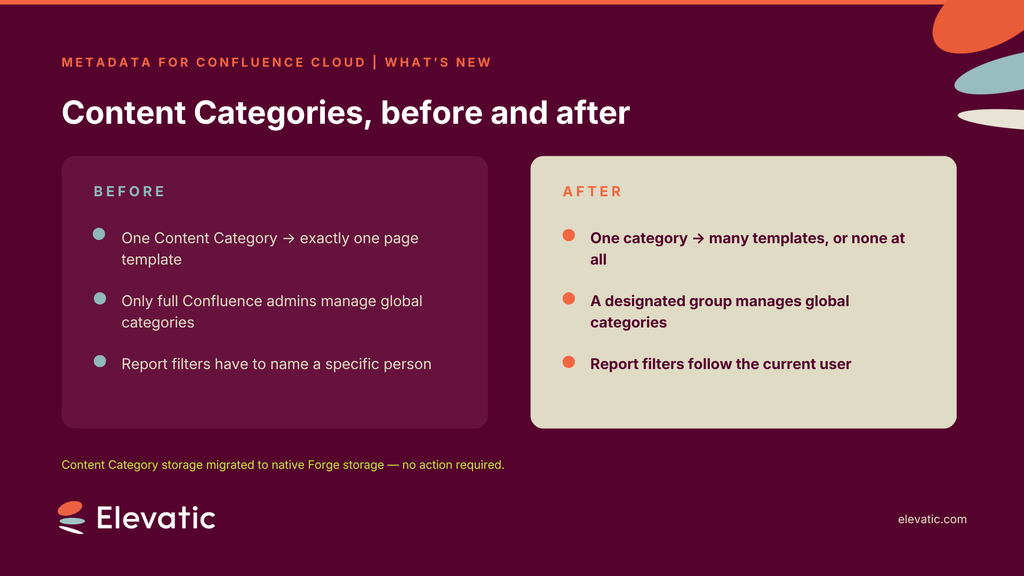
In most Confluence Cloud sites, a handful of global admins own the metadata model. So every new content category, every correction, every “can we add a field for that?” waits in someone’s queue. The latest release of Metadata for Confluence removes three of those constraints: a Content Category can now be linked to several page templates or to none at all, global admins can delegate Content Category management to a designated group without handing out full Confluence admin rights, and the Report macro can filter User fields by the current user. Underneath, Content Category storage has moved to native Forge storage. Nothing for you to do, but a more stable foundation for what comes next.
You add a Content Category for Process Documentation. Two teams want to use it — one with the ISO template, one with the internal audit template. You can only link one. So you duplicate the category, and now your taxonomy has two entries that mean the same thing.
Meanwhile, a space lead emails to ask for a new category. It’s a two-minute change, but it needs a Confluence admin, and the Confluence admins are busy running the site. Three weeks later, the team has given up and started tagging pages with labels instead.
None of this is a Confluence problem. It’s a permissions and modeling problem. The tools that structure your content are locked to the smallest group of people in the organization, and the model itself is more rigid than the way teams actually work. This release addresses both.
Use one category across many templates
A Content Category is the reusable definition of what a page is. Its metadata fields, their values, and how they get applied. Until now it carried exactly one page template, which quietly forced a one-to-one relationship between “what this page is” and “how this page is written”.
Real documentation doesn’t work that way. An Incident Report looks different for a security event than for a service outage, but it carries the same metadata either way. A Customer Project category might apply to a dozen page types across a space.
You can now link a Content Category to more than one page template — so one category serves several page shapes without duplication. And you can create a Content Category with no template at all, for metadata you want to apply to pages that already exist, or to pages people write freely.
The onboarding “How it works” dialog has been updated to reflect this, so admins setting up the app for the first time see the real model rather than the old constraint.
What this changes in practice: your taxonomy can stay small and meaningful. Fewer near-duplicate categories, less explaining to teams why Process Doc (ISO) and Process Doc (Audit) both exist.
Delegate metadata governance, not admin rights
Creating and editing global Content Categories used to require full Confluence admin rights — a role that also carries site-wide global permissions over users, groups, spaces and configuration. That’s a steep price for someone whose actual job is keeping the quality management taxonomy accurate.
The result is familiar: either you grant admin rights far too broadly, or you become the bottleneck for every taxonomy change in the site.
Global admins can now designate one group as Global Content Category Managers. Members of that group can create, edit and delete all global Content Categories — and nothing else. No user administration, no space configuration, no global permissions.In practice, this is likely the change that has the most immediate impact on day-to-day metadata work. Add your knowledge managers, quality managers, or documentation leads to that group, and taxonomy work moves to the people who understand the content, at the speed they need it.
Build personal report views with a current-user filter
The Report macro surfaces pages by their metadata — the practical payoff of tagging content in the first place. But a report filtered on a User field had to name a specific person, which meant one report per person, or a report that only worked for whoever built it.
You can now set the current user as the filter value for User fields in the Report macro. One macro, on one page, that shows each reader their own results.
That makes views like pages I own, documents awaiting my review or processes assigned to me something you build once and everybody uses. It also makes a shared “my documentation” page realistic without a maintenance burden.
Now running on native Forge storage
Content Category storage has been migrated from a hidden Confluence space to native Forge storage, Atlassian’s own hosted data layer for cloud apps.
No action is required from you. Your Content Categories, fields and values carry over as they are.
You get a cleaner architecture: app data lives in the platform’s managed store rather than in a space inside your site, which makes the app more stable and better positioned for future platform capabilities. For anyone still migrating from Data Center, Metadata set descriptions are now carried over to Cloud automatically as part of the migration.
This release also fixes an edit-link issue that sent admins to the wrong view when they opened a Content Category edit link in a new tab, and resolves dependency vulnerabilities across the app.
Approve the upgrade to switch it on
Because this release changes the app’s permissions, it ships as a major version and Confluence Cloud does not install those automatically. A site admin has to approve it before anything described above appears in your site.
Go to Settings → Apps → Manage apps, find Metadata for Confluence, and approve the pending update. Until that happens, your site keeps running the previous version, with your existing Content Categories and metadata untouched.
If your organization reviews app permission changes before approving them, this is the point to route it. The upgrade unlocks multiple templates, the managers group and the current-user filter.
Key Takeaway
Metadata models fail for the same reason knowledge bases fail: a small group designs the structure once, and everyone else has to work around it. Rigidity looks like governance until the day teams start routing around it with ad-hoc labels.
Treat your metadata model as something that has to evolve, which means the people closest to the content need to be able to change it, and the model itself has to accommodate more than one way of writing a page. Flexible category-to-template relationships and delegated management are what make that possible without loosening control of your site.
Structure is only worth building if the people who need it can maintain it.
Metadata for Confluence brings this model to Confluence Cloud. Custom metadata fields and Content Categories, applied through templates or on their own, with reporting across your content. It’s part of the Meridian Knowledge Structure Solution for teams building a full information architecture in Confluence.
Try Metadata for Confluence or talk to our team about your metadata model.